
Sales Automation: Benefits, Challenges, and Best Practices
Table of Contents
- Introduction
- What is Sales Automation?
- Understanding Sales Automation
- Types of Sales Automation
- Benefits of Sales Automation
- Sales Automation Challenges
- Effective Sales Automation Strategies
- Conclusion
1. Introduction
In today’s sales environment, speed, personalisation, and consistency are crucial for success. Handling leads by hand, following up with prospects, maintaining CRM systems, and tracking performance are no longer sustainable — especially for growing companies. This is where sales automation becomes essential.
Sales automation systems help businesses streamline their processes by automating repetitive tasks and optimising lead management. This ensures consistent engagement throughout the sales funnel. With automation in place, sales teams can focus on building relationships and closing deals, rather than spending hours on administrative work.
Research from Cirrus Insight shows that companies that fully adopt automation can see productivity increase by 25–50% and shorten sales cycles by 15–30%.
Implementing automation is not just an incremental change; it’s a fundamental shift in sales operations. Automation is vital for driving efficiency, ensuring consistency, and enabling scalability. It allows businesses to expand their sales activities without significantly increasing resources.
While the sales automation benefits are significant, challenges in sales automation exist. Over-automation, ineffective implementation, data integration issues, and data quality concerns can complicate the process. Understanding these factors is crucial for creating an effective and scalable sales automation strategy.
2. What is Sales Automation?
Definition:
Sales automation refers to using technology and sales automation tools to automate repetitive sales tasks, workflows, and processes throughout the sales cycle. Its goal is to reduce manual work, enhance consistency, and support scalable operations.
What Sales Automation Covers:
Modern sales automation systems typically include the following features:
Lead Capture and Qualification: Automatically gather leads from various sources and prioritise them based on set criteria.
Email Outreach and Follow-Up Automation: Automate personalised email sequences and follow-ups to ensure timely engagement without manual effort.
CRM Updates and Pipeline Tracking: Automatically update customer details, deal stages, and sales activities in real time.
Task Assignment and Reminders: Assign tasks to sales reps and set reminders to maintain workflow consistency.
Sales Reporting and Analytics: Generate insights on performance, track conversions, and monitor pipeline health.
These features enable sales teams to manage large volumes of leads efficiently while remaining responsive.
Takeaway

Are you facing challenges with setting up sales automation? Review this readiness checklist before you dive in.
3. Understanding Sales Automation
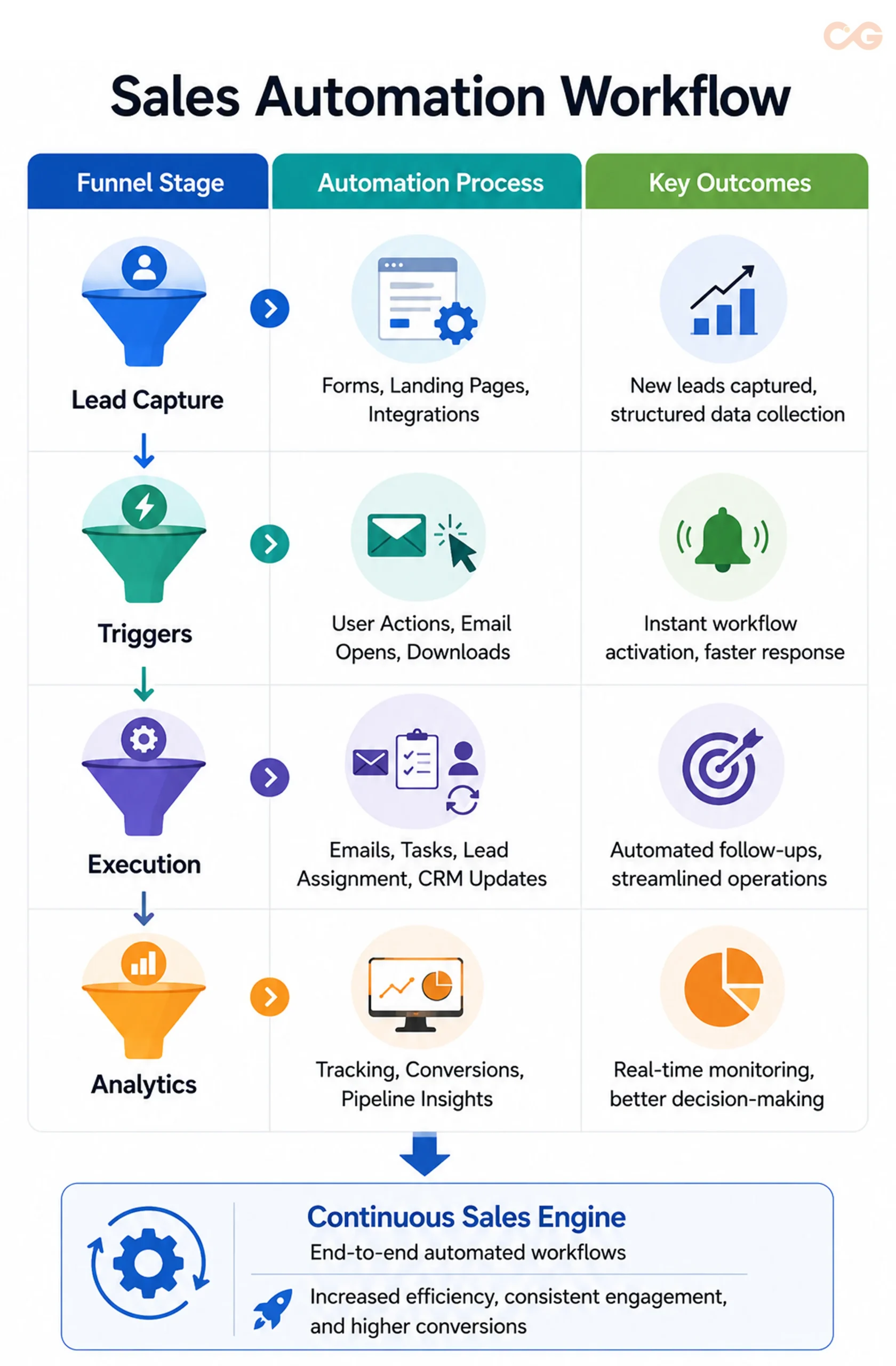
Sales automation simplifies the sales process through organised methods, automated triggers, and integrated systems. These systems can perform tasks based on data and user interactions, leading to consistent and efficient operations without manual intervention.
Key Steps in the Sales Automation Workflow
1. Data Capture
Data enters the system from various sources such as website forms, landing pages, CRM integration, chatbots, and external databases. The system automatically stores and organises this information, allowing sales teams to access and manage lead data without manual entry.
2. Trigger-Based Workflows
Captured data activates workflows designed for specific actions or conditions. For instance, triggers may include events like form submissions, content downloads, or email openings. This ensures timely progression through the sales process.
3. Automated Execution
When a workflow is triggered, the system carries out essential tasks, including:
- Sending emails
- Assigning leads
- Updating CRM records
- Scoring leads
These automated tasks maintain steady communication and ensure that no leads are overlooked, especially in high-volume sales environments.
4. Tracking and Optimisation
Analytics dashboards track performance at each stage of the sales funnel, focusing on engagement, conversion rates, and pipeline movement. This data helps teams refine workflows, close gaps, and improve overall sales performance.
This systematic approach guarantees that every lead receives attention and that interactions occur at the right moments, enhancing efficiency, scalability, and data-driven results.
People Also Ask
How does sales automation differ from CRM?
CRM systems focus on storing customer data. In contrast, sales automation systems actively carry out workflows such as follow-ups, lead assignments, and outreach sequences. Many modern CRMs include both functionalities.
4. Types of Sales Automation
Sales automation is an essential strategy that enhances every part of the sales process, from acquiring leads to analysing performance. Different sales automation systems can be deployed at each stage, helping teams operate more effectively and efficiently.
1. Lead Generation Automation: This system gathers leads from a variety of sources, such as third-party websites, forms, and landing pages. It automatically assesses these leads based on criteria like behaviour, demographics, and engagement levels.
2. Email and Outreach Automation: This tool streamlines the sending of emails and follow-up messages while tracking these communications. It ensures seamless and timely interactions with potential clients.
3. CRM and Pipeline Automation: Automated updates manage customer information, assign leads, and keep track of deal stages. This provides real-time insights into the sales process without requiring manual data entry.
4. Workflow Automation: This system organises workflow tasks, including scheduling, reminders, and notifications. It maintains a consistent approach for sales teams, helping them stay organised.
5. Analytics Automation: This tool generates performance metrics through dashboards and reports. It allows teams to monitor key indicators such as conversion rates, pipeline status, and sales cycle duration.
Each of these categories streamlines the sales process, making it more efficient, scalable, and data-driven.
People Also Ask
How do you choose the right type of sales automation for your business?
Select your sales automation tools based on your specific sales model, team size, and sales complexity. Identify your primary challenge — be it lead generation, outreach, or CRM management — and start automating that area first.
Can small businesses effectively use all types of sales automation?
Small businesses don’t need all sales automation tools at once. They should focus first on high-impact areas like email automation and CRM. They can then expand their automation as their sales processes grow.
Takeaway
Are you facing challenges with setting up sales automation? Review this readiness checklist before you dive in.
5. Benefits of Sales Automation
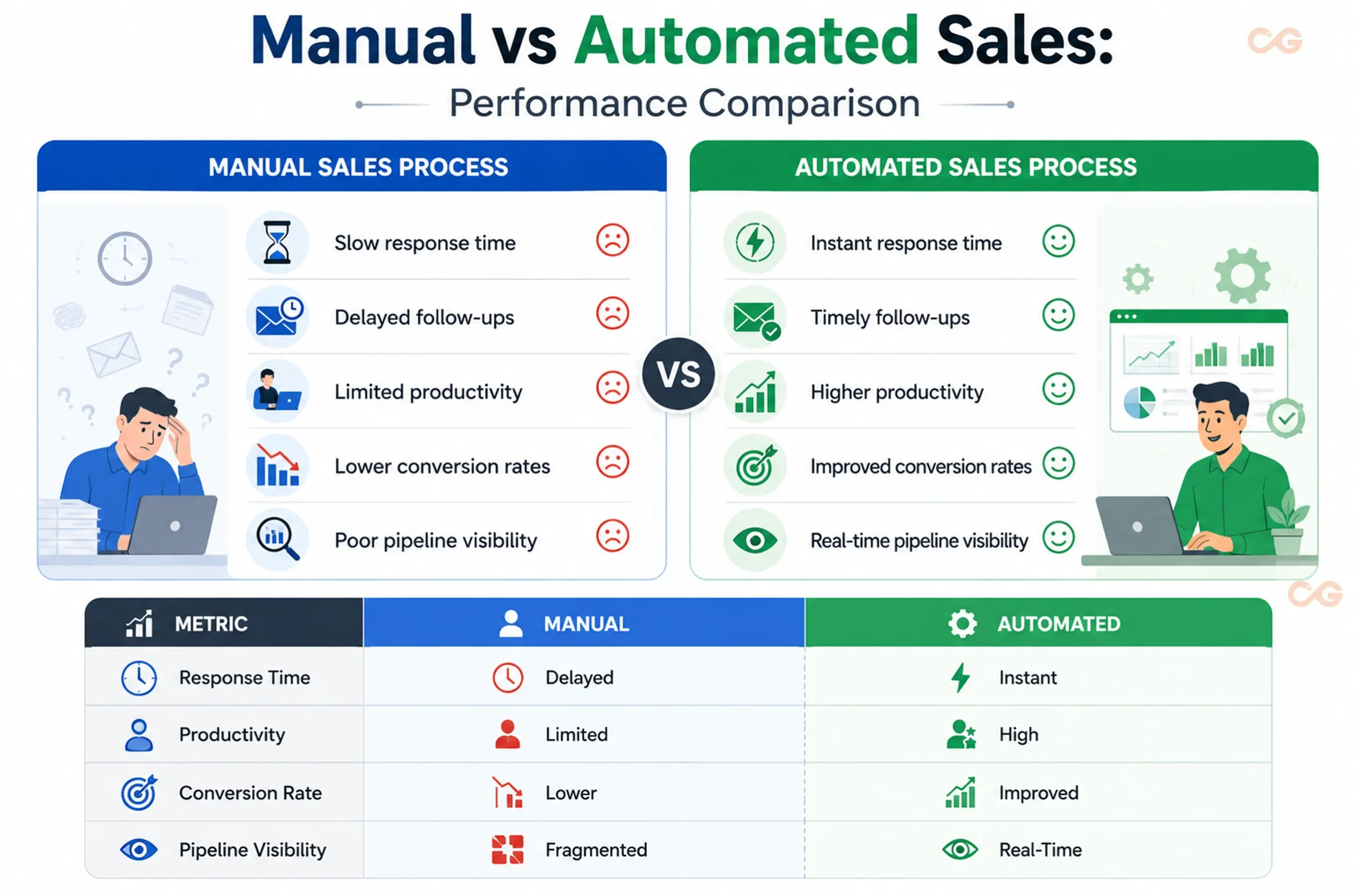
Sales automation delivers measurable benefits such as improved efficiency, consistency, and enhanced sales performance. It saves time for sales teams, allowing them to focus on strategic activities instead of administrative tasks.
Increased Sales Efficiency
One significant sales automation benefit is the reduction of manual workloads. Repetitive tasks like data entry and scheduling can take up valuable time, hindering productivity.
According to HubSpot’s State of Sales Report, 84% of sales professionals believe AI is a time-saver. By automating these routine tasks, teams can redirect their efforts toward critical activities like engaging with customers and closing deals.
Case Study: The Works & IBM
The Works leveraged IBM Watson Campaign Automation to implement targeted marketing campaigns. This approach led to deeper engagement and higher conversions, resulting in a 41% increase in online sales and a 16% boost in click-through rates through data-driven automation.
Improved Lead Management
Automation enhances the capture, prioritisation, and tracking of leads throughout the sales process. By utilising automated lead routing and scoring, we can identify and engage high-potential leads early on.
Sales automation systems simplify lead assignment, reduce manual errors, and create a more efficient sales pipeline. This leads to faster response times and improved organisation, as well as quality leads and consistent follow-up during the sales cycle.
Higher Conversion Rates
Sales automation systems ensure that we nurture leads using a structured approach and timely communication. This consistency builds trust and helps move prospects further along the sales funnel.
A study from the Journal of Marketing found that businesses with shorter sales cycles and less complicated deals can increase lead conversions by up to 23 percentage points when they employ automated lead nurturing.
Boosted Sales Productivity
Automation allows sales representatives to spend more time on sales activities rather than on administrative tasks. This freedom enables them to build relationships, conduct discovery calls, and negotiate deals.
As a result, sales teams can engage with more prospects, hold deeper conversations, and expedite deal progression through the sales funnel. Consequently, sales automation tools play a crucial role in enhancing overall productivity and performance.
Data-Driven Decision Making
A key advantage of sales automation tools is access to real-time performance insights. These platforms provide transparency into vital sales data, enabling informed decisions.
This includes:
- Pipeline tracking
- Conversion metrics
- Sales cycle analysis
- Forecasting
With accurate and up-to-date information, businesses can identify where sales are stalled, optimise strategies, and make quicker decisions to boost overall sales.
6. Sales Automation Challenges
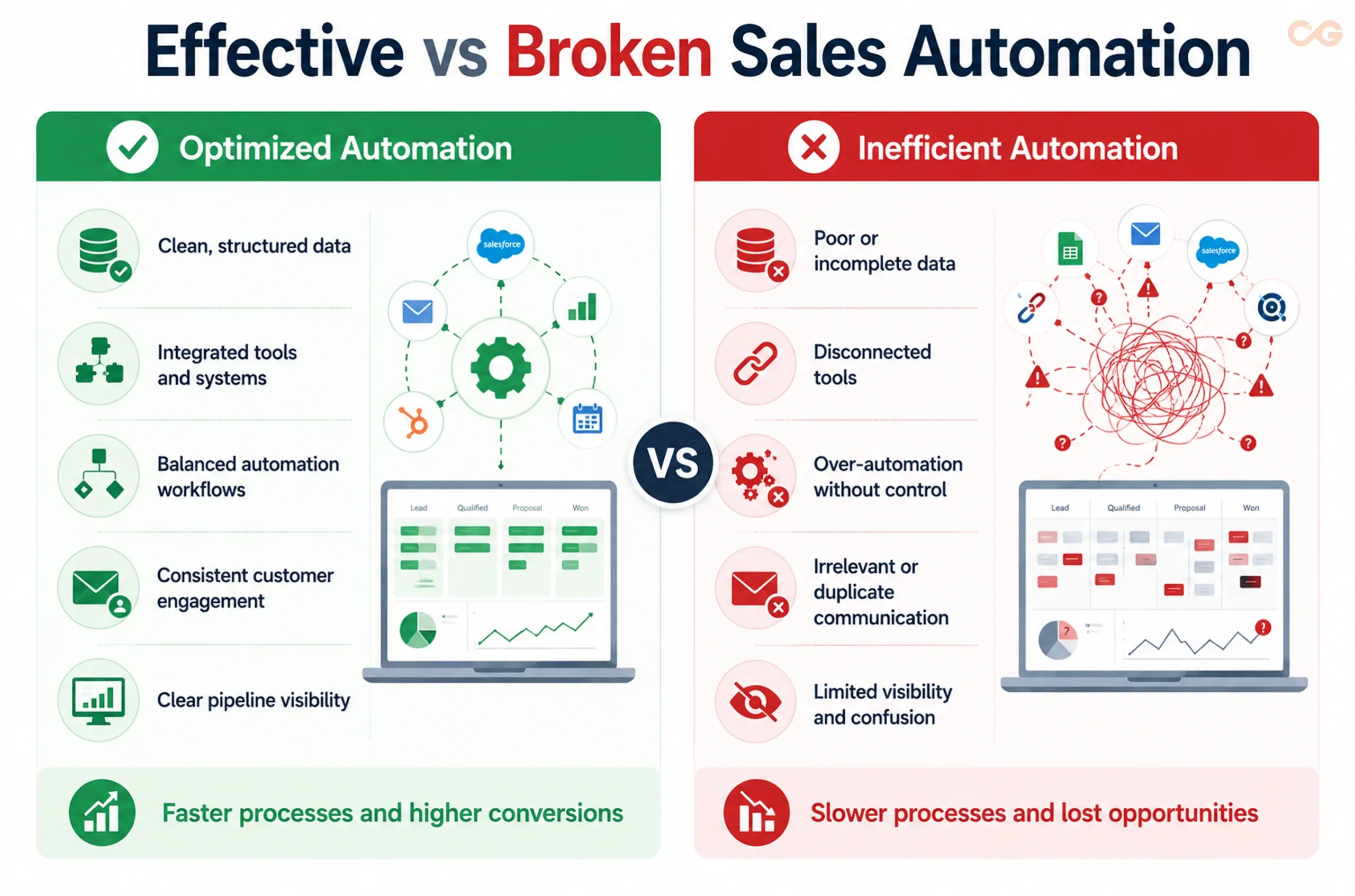
While sales automation offers many advantages, businesses must pay attention to its challenges in sales automation to prevent inefficiencies. Poor planning can complicate processes instead of simplifying them.
Risk of Over-Automation
Automation can diminish personal touch in customer interactions. If communication becomes too automated, it risks sounding robotic and disengaging for potential clients.
Personalised engagement is essential today. According to Salesforce’s report, 73% of customers expect businesses to anticipate their needs. It’s critical to balance automation with a human element in customer interactions.
Implementation Issues
Automating processes that are unstructured or inefficient can worsen existing problems. Instead of streamlining, automation can magnify inefficiencies in the sales cycle.
To effectively use sales automation, companies must first refine their sales processes. Automation should enhance these processes, not merely substitute them.
Integration Challenges
Integrating different sales automation tools, such as CRM systems and email marketing platforms, can be tough, especially as the tech stack grows.
When done incorrectly, integration can result in disorganised data and chaotic workflows. This lack of alignment can hinder automation effectiveness and confuse sales teams.
Data Quality Concerns
High-quality, structured data is essential for automation to function properly. Flawed or inconsistent data can yield incorrect outcomes in automated workflows.
Poor quality data can result in:
- Wrong follow-ups
- Duplicate outreach
- Inaccurate reports
Maintaining current and clean data is vital for the success of sales automation tools.
Learning Curve
Adopting new sales automation tools requires technical knowledge and adaptation to new processes. Teams need adequate time to learn how to leverage these systems effectively.
Insufficient training can hinder teams from maximising automation features, lessening their overall impact.
Common Mistakes in Sales Automation
It’s important to identify common pitfalls that can arise during automation implementation. These errors can negatively affect efficiency and customer satisfaction.
Frequent mistakes include:
Automating flawed processes: Relying on automation for broken processes only exacerbates issues.
Over-sending automated emails: Too many emails can overwhelm prospects and diminish their interest.
Neglecting CRM data cleanup: Poor data leads to bad targeting and ineffective communication.
Using generic messaging: Lack of personalisation reduces the effectiveness of outreach.
Creating overly complex workflows: Complicated automation systems are harder to manage and optimise.
To fully leverage the benefits of sales automation, companies must steer clear of these common missteps.
7. Effective Sales Automation Strategies
To fully leverage sales automation tools, companies need a clear implementation strategy. These tools alone won’t deliver success; they must integrate well with existing processes, data, and team collaboration.
Begin with Basic Workflows
Focus on simple, repetitive tasks with low impact, such as:
- Follow-ups
- CRM updates
- Lead assignments
These straightforward workflows reduce implementation challenges and allow teams to gradually adapt to automation. They also provide opportunities for quick wins before tackling more complex tasks.
Keep the Human Element
Automation should enhance, not replace, human interaction. While automated workflows can streamline sales, trust, personalisation, and relationship-building remain vital.
According to HubSpot’s State of Sales Report, 36% of sales professionals believe they assist buyers in decision-making, highlighting the importance of human engagement in sales. Balancing automation with personal communication is key to strong customer relationships.
Align with Existing Sales Processes
Automation should support and enhance your current workflows, not disrupt them. Before implementing sales automation tools, define your sales stages, processes, and customer journeys.
This alignment ensures automation complements structured workflows, making it more effective.
Ensure Data Integrity
Effective automation relies on high-quality data. Poor data can lead to mistakes and unwanted outcomes.
Conduct regular data audits, and use standardised fields and data entry practices to ensure consistency and reliability in your sales automation efforts.
Integrate Tools Seamlessly
Sales operations today depend on various tools, like CRM systems, email services, and analytics platforms. Smooth integration between these systems is essential for consistency and visibility.
When sales automation tools work well together, they enhance data flow, reduce duplication, and provide a clear view of the sales pipeline.
Identify What to Automate
Not every sales task is suitable for automation. While these tools can boost efficiency, overusing automation may harm effectiveness and customer relations.
Separate routine, process-driven tasks from those requiring human judgment and personalisation.
Tasks for Automation:
- Meeting reminders
- Lead assignments and routing
- Follow-up scheduling
- Status updates for proposals
- Lead scoring and qualification
These tasks are rule-based and time-consuming, making them ideal for automation.
Tasks That Should Stay Human:
- Final negotiations
- Building relationships
- Conversations about high-value deals
- Handling complex objections
- Strategic account discussions
These interactions require context, empathy, and decision-making, making human involvement crucial for maintaining trust and closing deals.
Common Mistakes in Sales Automation
It’s important to identify common pitfalls that can arise during automation implementation. These errors can negatively affect efficiency and customer satisfaction.
Optimize Continuously
Sales automation isn’t a one-time task; it demands ongoing review and enhancement. Regularly analyse the following metrics:
- Response rates: The percentage of prospects who respond to outreach.
- Conversion rates: The percentage of leads that become customers.
- Pipeline movement: The progress of deals through different pipeline stages.
- Workflow efficiency: The speed and smoothness of processes.
Continuous optimisation identifies bottlenecks, streamlines operations, and maximises automation benefits.
Key Takeaway
Selectively applying automation is crucial for success. Clearly defining which tasks to automate allows businesses to maximise benefits while minimising challenges, particularly the risks of over-automation and the loss of personalisation.
Takeaway
Are you facing challenges with setting up sales automation? Review this readiness checklist before you dive in.
8. Conclusion
Sales automation goes beyond just saving time; it shapes a more organised and scalable sales system. In today’s competitive landscape, quick responses and a consistent sales funnel set successful companies apart.
However, the effectiveness of automation tools relies on their strategic implementation rather than merely adopting technology. Companies that view automation as a strategic asset tend to build meaningful customer connections while maintaining operational efficiency.
Finding the right balance is key. Excessive automation can harm relationships, while too little can hinder growth. The most successful organisations maximise the advantages of sales automation and proactively tackle challenges to ensure automation complements human interaction.
As automation technologies advance, the focus will shift from simply automating tasks to enhancing entire sales ecosystems. Businesses that combine automation with efficient workflows, accurate data, and customer-centric strategies will achieve long-term sales success and sustainable growth.