How to Dominate Google Search with Zero-Click SEO Strategies
Table of Contents
- Introduction
- Understanding Zero-Click Searches
- Why Are Zero-Click Searches Increasing?
- Zero-Click SEO: Why It Matters
- Key Zero-Click SEO Strategies
- A. Focus on Featured Snippets
- B. Utilise Google’s People Also Ask (PAA) Feature
- C. Implement Schema Markup for Enhanced Visibility
- D. Optimising Google My Business for Local Searches
- E. Boost Your Brand’s Visibility in Knowledge Panels
- F. Voice Search Optimisation: Capturing Zero-Click Traffic with Conversational Content
- Evaluating Success in Zero-Click SEO
- Conclusion
Introduction
Google’s search results page (SERP) has evolved significantly. It’s no longer just a basic list of website links. Now, it features various elements like featured snippets, knowledge panels, People Also Ask (PAA) boxes, direct-answer boxes, and AI overviews. This shift has led to the rise of zero-click search, where users find authoritative answers directly in the SERP without needing to visit an external site. According to Rank Fishkin, about 60% of Google searches end without clicks.
This trend impacts SEO and forces brands to rethink their strategies. Traditional approaches, like enhancing click-through rates (CTR) to boost organic traffic, are inadequate. Companies must shift focus to high-intent queries. They should implement advanced strategies like structured data markup and schema markup to secure prominent positions in rich results and local SEO features, including Google Maps and local packs.
Zero-click SEO is vital for traffic generation in a competitive market. By enhancing visibility within these advanced SERP features, brands can improve their authority, engage users, and attract attention, even in a clickless environment. Adopting a future-oriented SEO strategy that emphasises direct responses and interactive SERP elements over traditional click-based metrics is essential.
Understanding Zero-Click Searches
What is a Zero-Click Search?
A zero-click search happens when a user’s question gets answered directly on the SERP. The user inputs a query and sees an immediate response, such as a snippet or summary generated by Google’s algorithm. Because the information is readily available, the user often feels no need to explore further. This shift demonstrates Google’s aim to become a definitive answer engine, making the SERP a go-to source for quick and reliable information.
How Zero-Click SEO Is Different From Traditional SEO
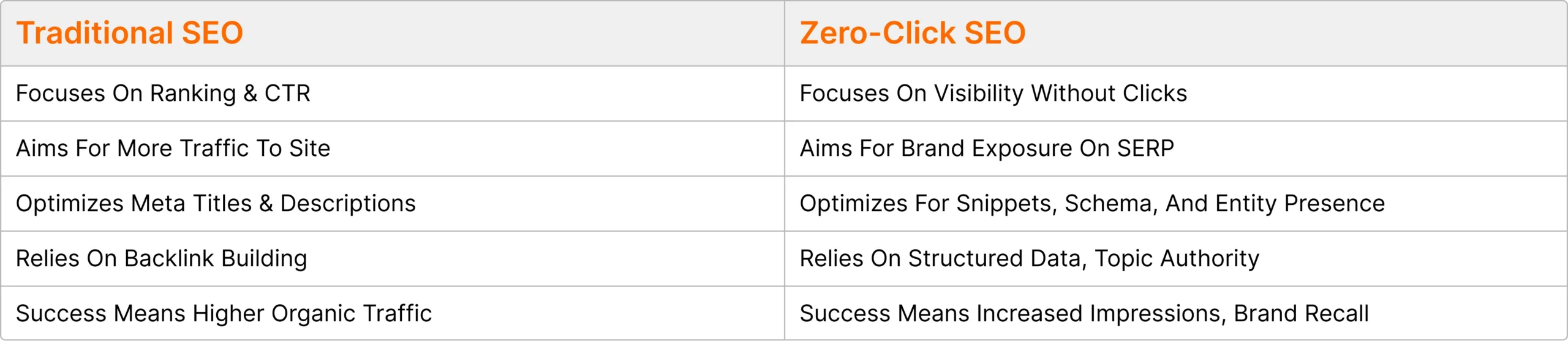
Below are the 6 important types of zero-click searches;
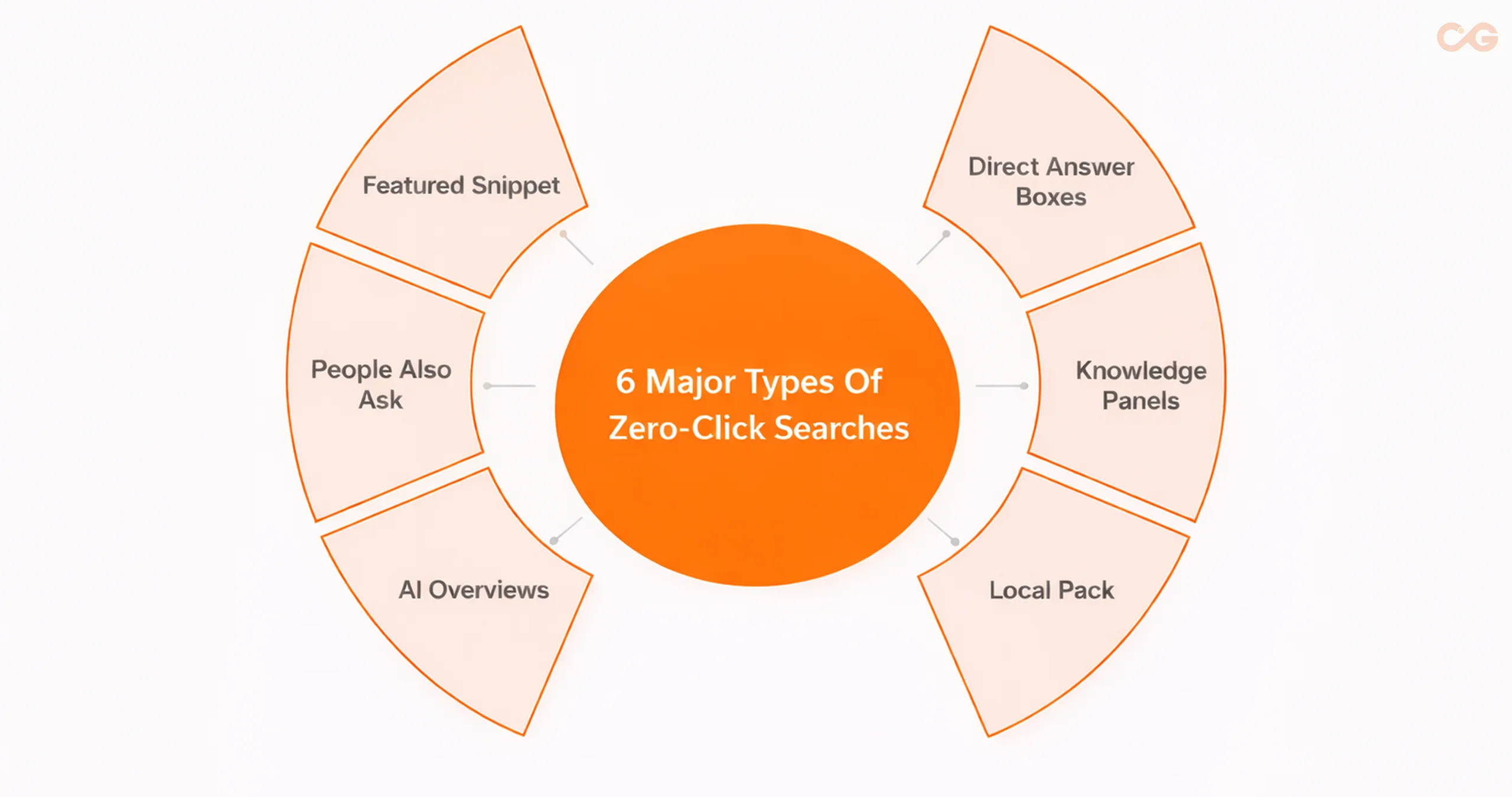
1) Featured Snippets
Featured snippets are concise answer boxes that appear on Google for user inquiries. They provide short, clear answers and include links to the full articles beneath them. These snippets can take various forms, such as videos, tables, lists, and paragraphs.
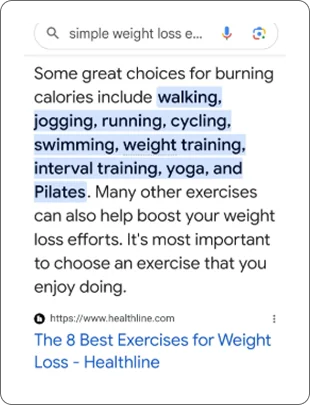
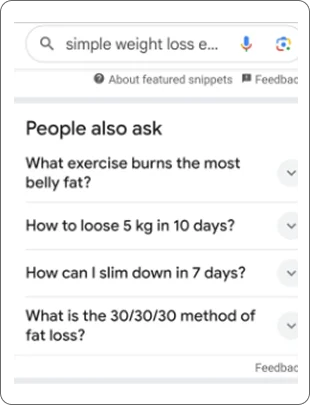
2) People Also Ask (PAA)
People Also Ask boxes feature common follow-up questions related to your search. When you click on one of these questions, you get a direct answer and a link to the related article. Additionally, you’ll see more relevant questions based on your selection.
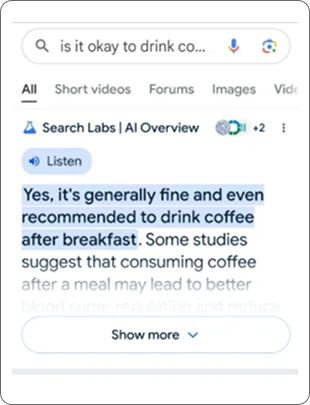
3) AI Overviews
AI overviews present generated summaries at the top of Google search results. Google uses advanced models like Gemini to provide quick, straightforward answers to complex queries. It leverages natural language processing (NLP) to grasp the context of your questions.
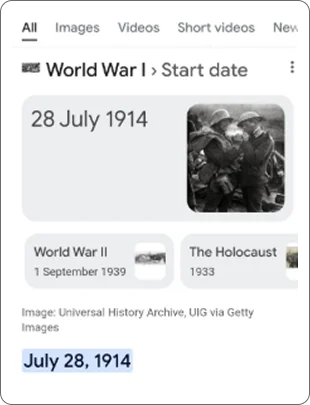
4) Direct Answer Boxes
Direct answer boxes are succinct versions of featured snippets. They display straightforward responses at the top of Google searches, catering to users looking for quick answers without sifting through lengthy content. These are especially common in zero-click searches.
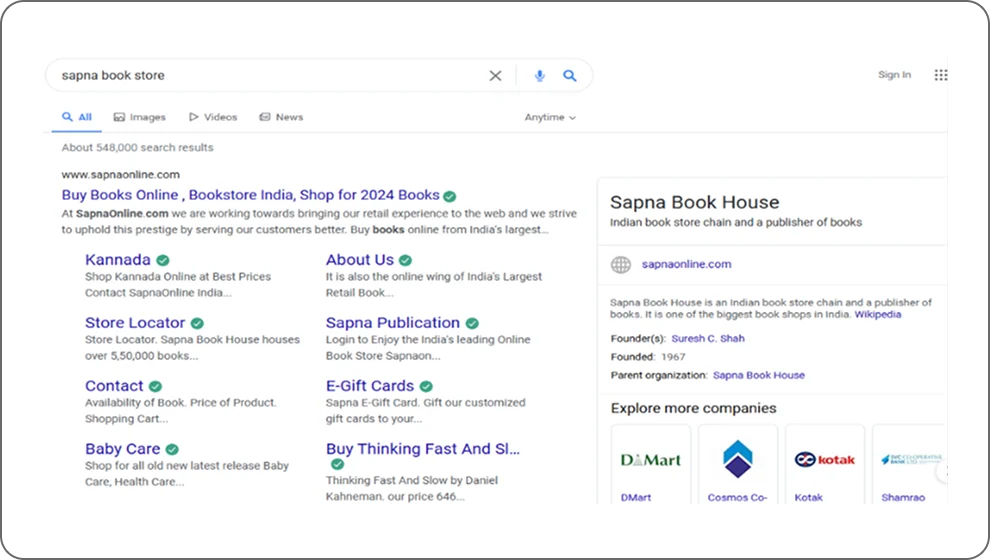
5) Knowledge Panels
Knowledge panels are information boxes that appear on the right-hand side of search result pages when you seek details about a brand, person, or location. They deliver essential information without requiring users to click through to other links. This data is often pulled from Wikipedia.
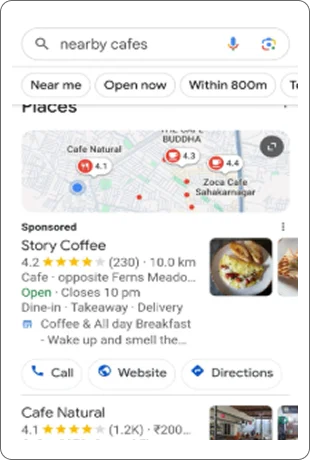
6) Local Pack
Local packs, also known as map packs, showcase nearby businesses, shops, or places, along with basic details like ratings, distances, and hours. To access more specific information, like contact details or website links, you’ll need to select the individual listings.
Takeaway

Ready to Dominate Google’s SERP Beyond Clicks?
Download this free checklist today and optimise your pages for zero-click visibility with featured snippets, FAQs, AI Overviews, and more.
Why Are Zero-Click Searches Increasing?
Why Are Users Getting Answers Without Clicking on Websites?
Several factors explain the trend toward zero-click answers:
Instant Gratification and Convenience: Users want quick responses. Google delivers these directly on the SERP, meeting the demand for speed.
Increase in Mobile and Voice Search: Both mobile and voice searches prioritise short, direct answers, catering to users needing fast information.
Enhanced SERP Experience: Google’s focus on structured data leads to improved content context, allowing users to find answers without navigating away from the search results.
Trust in Google’s Authority: Users often trust Google’s featured snippets and knowledge panels as reliable answers, reducing the need to explore other sites.
Local Search Efficiency: Local packs and Google Maps provide essential information, such as addresses and reviews, frequently making clicks unnecessary.
Emergence of AI-Powered Summaries: AI-generated summaries present concise answers, contributing to users’ preference for immediate information.
How Does Google’s Push for Instant Answers Impact User Behaviour?
Google’s emphasis on instant answers is reshaping how users find information. Here are the key factors influencing this shift:
Convenience: Users can obtain quick answers without sifting through multiple websites.
Efficiency: Direct responses save time and effort, especially for those on mobile devices.
Trust: Featured snippets and knowledge panels are increasingly viewed as reliable sources.
What Are the Implications of Zero-Click Searches on SEO?
The rise of zero-click searches demands a strategic shift in SEO. Here’s how:
Decreased Organic Traffic: As more users receive answers directly on the search results page (SERP), fewer visitors click through to websites.
Increased Competition for Featured Snippets: With featured snippets gaining importance, competition for these spots is intensifying, necessitating organic visibility efforts.
Significance of Structured Data: Implementing schema markup helps search engines grasp your content’s context, enhancing your chances of appearing in featured snippets and knowledge panels.
Emphasis on Local SEO: As users search for nearby businesses and services while multitasking, local search results become crucial.
Recent statistics highlight the growing importance of zero-click searches:
- SCRUMDIGITAL found that over 75% of mobile searches now result in zero clicks.
- Semrush Sensor reported that approximately 51.85% of searches generate “People Also Ask” (PAA) boxes.
- According to Semrush Blog, featured snippets make up nearly 50% of mobile search results.
- Safari Digital noted that 97% of users find local businesses — such as directions, hours, or websites — through online searches.
Actionable Insights
Companies must adapt their SEO strategies to address these changes. Focus on optimising for featured snippets, enhancing local search visibility, and investing in structured data implementation. Prioritising quick, reliable answers will keep businesses relevant in today’s search landscape.
These statistics highlight the growing dominance of zero-click searches and the changing way users interact with Google. As search behaviour continues to evolve, businesses need to understand how zero-click SEO can create new opportunities for visibility and engagement.
Zero-Click SEO: Why It Matters
Now that zero-click searches have become a significant part of Google’s search experience, businesses must adapt their SEO strategies accordingly. Rather than focusing solely on generating clicks, brands should prioritise visibility, authority, and user trust across Google’s search features.
How to Increase Brand Visibility on the SERP Without Clicks
To effectively showcase your brand, aim for visibility in key search features like featured snippets and knowledge panels. These positions are critical because potential customers are actively looking for answers.
Optimising for zero-click SEO allows brands to connect directly with users on the search page. This increases brand impressions and recognition without requiring clicks. Over time, this visibility builds trust, which is crucial for lasting customer relationships and loyalty.
Does Being in a Featured Snippet Build Brand Authority?
Earning a spot in a featured snippet, which appears at the top of search results, positions your brand as an authoritative source. Google selects these snippets carefully to provide the best answers to user queries. Securing this visibility not only elevates your content above other organic listings but also signals to users that your brand is trusted and credible.
This authority fosters user confidence and encourages engagement across all platforms, even if users don’t visit your site right away. When a brand appears in multiple SERP features, it amplifies this credibility and demonstrates genuine expertise.
How Does Zero-Click SEO Drive Lead Generation and Conversions?
While zero-click searches may limit immediate organic traffic and click-through rates, they don’t hinder overall lead generation or conversions. Instead, they transform how users interact with your brand. Increased visibility and established authority on the SERP lay a solid foundation of trust. Over time, this helps generate higher-quality leads and boosts conversion rates.
When users repeatedly see your brand name in zero-click-optimised search results, they are more likely to seek out your website or contact your business for more information. Although zero-click searches present challenges, such as reduced immediate engagement and lower on-site metrics, they require you to innovate your SEO strategies.
Focus on creating effective conversion pathways that balance providing instant authoritative responses with deeper user engagement. This approach enhances your chances of success in the evolving digital landscape.
Key Zero-Click SEO Strategies
In today’s digital landscape, where zero-click searches are on the rise, it’s crucial for brands to enhance their approach by implementing effective SEO strategies. Traffic isn’t just about click-through rates (CTR) anymore; brand authority also plays a key role.
Here are the essential zero-click SEO techniques to boost brand authority:
A. Focus on Featured Snippets
Featured snippets stand out as the most prominent zero-click searches. They efficiently address a variety of informational inquiries, providing users with quick answers.
Key Types of Featured Snippets include:
a) Paragraph Snippets: These deliver concise answers in a brief paragraph at the top of search results.
b) List Snippets: Ideal for presenting information in point form, these effectively answer user queries.
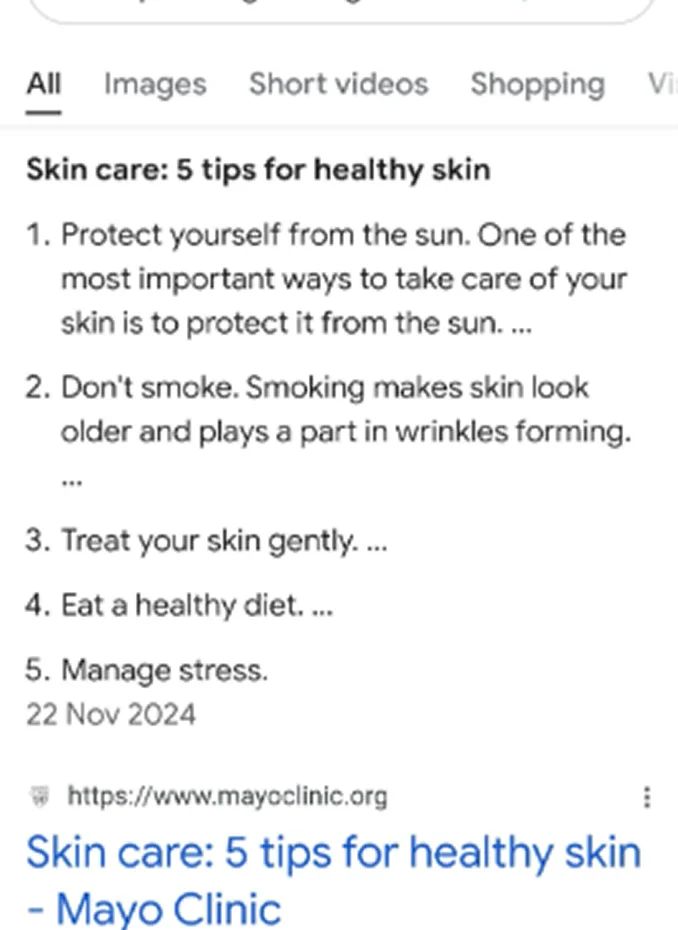
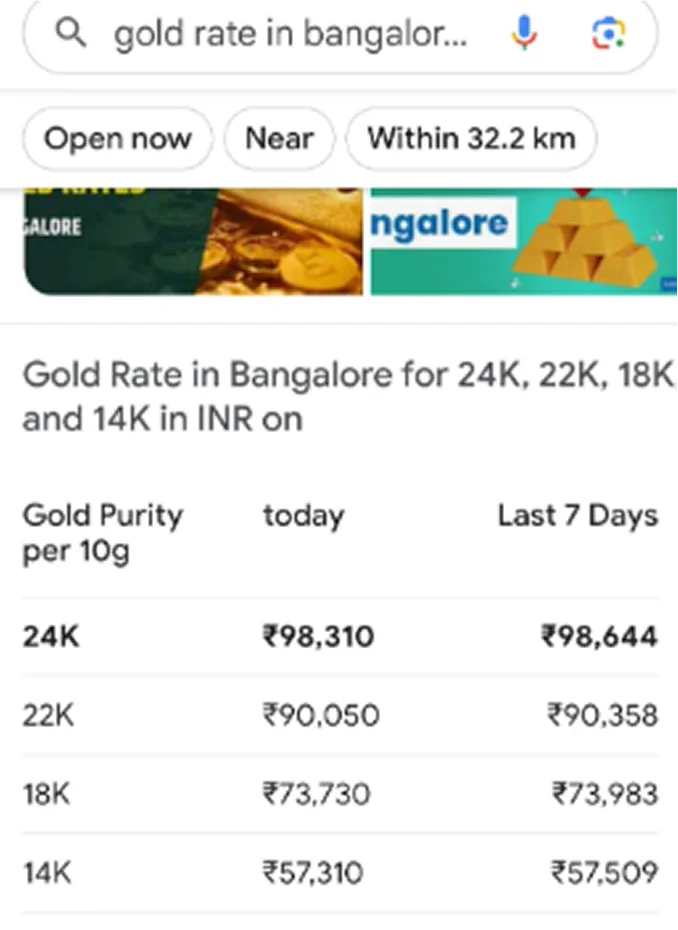
c) Table Snippets: These format responses in tables, perfect for comparison-related searches.
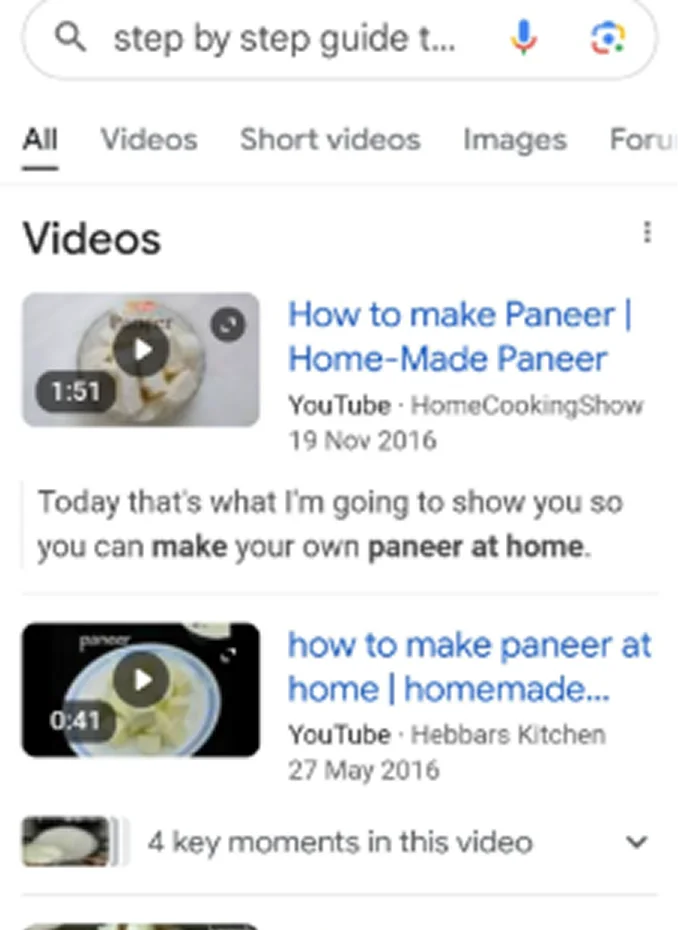
d) Video Snippets: These offer answers through videos, providing thorough guidance for user queries.
Effective Content Structuring for Snippet Capture
- Start with Direct Answers: Begin by offering a clear and brief answer to the question within the first 40-60 words. A strong approach is to use an “is” statement for definitions.
- Use Questions as Headings: Format your headings as questions to highlight the relevance of your content.
- Match Snippet Formats: Analyse the formats of current snippets (like paragraphs, lists, or tables) related to your target keyword and replicate that structure in your own content.
- Enhance Scannability: Incorporate bullet points, numbered lists, and short paragraphs to facilitate easy reading and extraction.
- Enhance Connectivity: Implement structured data or schema markup to help Google better understand your content’s context, increasing the likelihood of snippet inclusion.
Best Practices for Featured Snippet Success
- Target High-Intent Queries: Focus on queries that show users are looking for factual answers, such as definition comparisons and step-by-step tutorials.
- Be Concise Yet Informative: Ensure your responses are short enough to meet snippet requirements while thoroughly addressing the user’s needs.
- Monitor and Adapt: Regularly assess the performance of your snippet content and adjust for shifts in SERP features and algorithm changes to maintain your ranking.
Utilise Google’s People Also Ask (PAA) Feature
Broaden Your Authority Using the PAA Section: Google’s PAA feature displays related questions beneath featured snippets, enriching the knowledge around your topic.
Example: Searching for “Email marketing strategy” brings up questions like:
- What is an email marketing strategy?
What are the 5 T’s of email marketing?
You can find answers by simply clicking on these questions, along with links to relevant articles.
The People Also Ask (PAA) feature on Google is now a crucial tool for enhancing SEO for brands. It not only increases visibility but also establishes content as a trusted source since it addresses audience questions directly.
How to Increase Your Chances of Appearing in Google’s PAA Box
The first step to ranking in Google’s People Also Ask (PAA) section is conducting thorough keyword and question research to identify the specific queries your target audience is searching for. Use tools such as Google Search Console, AlsoAsked, AnswerThePublic, and other PAA research tools to uncover frequently asked questions related to your niche.
- Analyse the People Also Ask boxes for your primary keywords to identify commonly asked questions.
Click on existing PAA questions to reveal deeper, related questions and expand your list of content ideas.
Prioritise questions that align with your expertise and match the user’s search intent.
By answering these questions, your content is more likely to address real user needs, uncover overlooked keyword opportunities, and improve its chances of appearing in Google’s People Also Ask results.
Structure Content for Clear Answers
Google favours content that provides concise, straightforward answers to PAA queries, ideally within 40-60 words. Follow these guidelines for effective content:
- Use question-based headings (H2 and H3) that closely match the PAA queries relevant to that section.
Start each new section with one clear, direct answer, avoiding jargon.
For better readability and to increase snippet eligibility, use bulleted or numbered lists.
Include relevant images that complement your content, along with descriptive alt texts to boost engagement.
Implement FAQ schema markup so Google can better interpret your content structure, increasing your chances of appearing in PAA.
Well-structured, clear answers enhance your likelihood of being featured in PAA and improve user engagement.
Implement Schema Markup for Enhanced Visibility
Use schema markup to boost your content’s visibility in search results. Schema markup is a standardised code, often in JSON-LD format, embedded in your website’s HTML. It helps search engines understand your content better.
By providing clear context for page elements, schema markup allows your content to appear in rich search features, including featured snippets, Knowledge Panels, Direct Answer Boxes, and the PAA section. Essentially, it helps connect your content with search engine understanding, making your site more likely to gain rich results and zero-click searches.
The Role of Structured Data in SEO and Traffic Generation
Enhanced Visibility in Search Results
Implementing Schema Markup allows your content to feature in advanced search results, such as review ratings, event listings, and product displays. These visually appealing results not only attract more users but also boost your brand’s credibility.
Increased Click-Through Rate (CTR) and Organic Traffic
Pages utilising schema markup can achieve up to 82% higher CTR compared to those that don’t. Additionally, users tend to spend 1.5 times longer on these pages, as indicated by SIXTH CITY Marketing.
Benefits for Zero-Click and High-Intent Searches
With the growth of AI summaries and zero-click searches, schema markup helps your content appear directly in search features. This generates traffic even when users do not click through to your site.
Key Steps for Implementing Schema Markup
1. Choose the Right Schema Type
Determine which type of content you want to mark up — options include FAQ, product, review, or event. Your selection should align with your SEO strategy and targeted search features.
2. Generate Schema Markup
Use reliable tools to create structured data in JSON-LD format, which Google prefers. Some recommended tools include:
- Google’s Structured Data Markup Helper: User-friendly with support for multiple schema types.
Merkle’s Schema Markup Generator: Simplified for creating various schema types.
Schema.dev and TechnicalSEO.com: Offer templates and testing for advanced needs.
Schema Builder (Chrome Extension): Allows you to copy and edit schema from any site.
Schema.org Generator: A comprehensive tool for all schema.org types.
3. Add Schema to Your Website
Insert the generated code into the <head> section of your HTML page, or place it in the appropriate area of your CMS. You can also use any schema integration tools your CMS offers.
4. Validate and Test Your Schema Markup
Ensure there are no errors in your structured data before going live. Use these tools to check:
- Google Rich Results Test: Verifies eligibility for rich features and visualises how your markup appears.
Schema Markup Validator (schema.org): Checks if your markup is valid for all schema types.
Structured Data Testing Tool: Identifies errors and missing elements.
5. Monitor and Optimise
Regularly check for schema errors, especially after site updates. Keep an eye on your visibility in search features through Google Search Console or third-party SEO tools.
Essential Types of Schema Markup and Their SEO Benefits
1. Article Schema
Enhances the visibility of blogs and news articles by providing rich snippets that include the author, date, and images, building trust in search results.
2. Product Schema
Essential for e-commerce, this highlights key product details like price, availability, and customer reviews to drive clicks and conversions through search results.
3. FAQ Schema
Displays frequently asked questions directly in search results, allowing content to address user queries upfront. This leads to lower bounce rates and higher CTR.
4. Local Business Schema
Crucial for local SEO, this shows your business’s address, phone number, hours, and location in Google Search and Maps, drawing in local customers.
5. Review Schema
Displays star ratings and review counts, enhancing trust in your business and increasing the likelihood of clicks.
6. Breadcrumb Schema
Clarifies the structure of your webpages for both search engines and users, improving navigability and user experience in SERPs.
7. How-To Schema
Breaks down instructional content into clear steps, making it more accessible. This enhances visibility and positions your brand as an expert.
8. Event Schema
Directly presents event details such as date, time, location, and ticketing information in search results, boosting awareness and attendance.
Optimising Schema Markup for Zero-Click SEO
To enhance your brand’s visibility in zero-click searches, where users find answers directly on the SERP, employing schema markup is a fundamental strategy.
Here are effective strategies to enhance your schema markup for zero-click SEO:
Focus on Specific Search Features
Choose schema types that drive zero-click results like FAQ, How-to, Review, Event, Product, and Local Business. Such schemas boost your chances of appearing in Featured Snippets, People Also Ask sections, Knowledge Panels, Google Map packs, and Direct Answer Boxes.
Align with User Intent
Tailor your schema for high-intent queries and evergreen content. FAQs and How-to formats are excellent for addressing common questions and providing step-by-step guides. This increases the likelihood of your content being displayed as a direct answer in search results.
Local Optimisation
Utilise Local Business and Event schema to improve your visibility in Google Map packs and local panels. These are key sources for generating zero-click results for your business.
Validate and Monitor Your Schema
Regularly test your schema using the Google Rich Results Test and Schema Markup Validator. This ensures eligibility for rich results. Use Google Search Console and SEO tools to track occurrences of your content in zero-click features, allowing for data-driven adjustments.
Stay Updated
Continuously refine your schema implementation to adapt to new search features and AI developments. This approach will enhance your zero-click exposure.
The Importance of Schema Markup in SEO
According to the research of SIXTH CITY Marketing, only about 30% of websites utilise schema markup, presenting a significant opportunity to gain a competitive edge. Furthermore, 72.6% of first-page search results incorporate schema markup. By implementing structured data, you can increase your chances of being featured in rich results.
Recommended Tools for Schema Markup Generation
1. Merkle Schema Markup Generator: Ideal for generating schemas like FAQs and product reviews.
2. Google Structured Data Markup Helper: Use this tool to highlight elements on a sample page for markup generation.
Recommended Tools for Schema Validation
1. Google Rich Results Test: Test your markup to identify errors and view previews.
2. Schema.org Validator: An official tool for validating structured data.
Optimising Google My Business for Local Searches
To excel in local SEO in 2026, mastering Google Business Profile optimisation is essential. The rise of zero-click searches and advanced features like Knowledge Panels and Google Map packs necessitates a well-optimised GMB profile. This strategy supports high-intent queries, increases organic traffic, and establishes brand authority without requiring clicks to your website.
Business Information Optimisation for Better Local Visibility
Ensure Accurate Business Information
Maintain accurate and consistent NAP (Name, Address, Phone Number) across all platforms. This consistency is crucial for local SEO, enabling Google to effectively display your business in search features and map results.
Create a Compelling Business Description
Craft a clear and engaging business description that integrates relevant keywords and highlights your unique selling points. Select appropriate categories and attributes to connect your profile with relevant queries, thus improving your chances for Knowledge Panels and local searches.
Utilize GMB Attributes
Leverage GMB attributes to showcase unique aspects of your business, such as accessibility and service options. This can attract consumers searching in zero-click formats and enhance your presence in AI-focused searches.
Enhancing User Engagement with Visual Content
High-Quality Images and Videos: Share professional-grade photos and videos that accurately represent your brand and offerings. Listings with compelling visuals receive more views and interactions. This boosts your brand’s call to action and increases organic traffic.
Frequent GMB Updates: Regularly post updates about your business, including offers and events, on Google My Business (GMB). These posts show up in the Knowledge Panel and search results, complementing your lasting content. They keep your audience engaged and informed.
Proactive Q&A Management: Take charge of the Q&A section by answering common questions. Well-crafted responses can appear in the “People Also Ask” (PAA) results, enhancing your chances of gaining featured Snippets and direct Answer Boxes. This elevates your visibility in zero-click search results.
Building Trust and Authority through Reviews
Request and Respond to Reviews: Encourage satisfied customers to leave reviews. Respond to all feedback thoughtfully. Positive reviews establish credibility for both your audience and Google, which can improve your rankings in local search results and the Knowledge Panel.
Utilise AI and Automation Tools: Adopt AI-driven review tools and automated replies. These solutions save time and ensure a consistent brand voice while engaging with customers.
Takeaway
Ready to Dominate Google’s SERP Beyond Clicks?
Download this free checklist today and optimise your pages for zero-click visibility with featured snippets, FAQs, AI Overviews, and more.
Structured Data and Schema Markup: Enhancing Search Visibility
Implement Local Business Schema: Adding structured data markup (schema markup) to your website strengthens the connection with your GMB profile. This enhances your chances of appearing in Knowledge Panels, Google Maps, and other key search features, driving traffic from zero-click searches.
Optimise for Voice Search: With about 58% of voice searches aimed at local businesses, applying schema markup and targeting long-tail, “near me” phrases will boost your local SEO efforts, as per the statistics of Huddle Creative.
Monitoring Performance and Ensuring Continuous Improvement
Analyse GMB Insights: Regularly check GMB insights to understand key metrics such as profile views, search queries, and user engagement with your posts. This data helps you refine SEO strategies and identify new opportunities.
Stay Informed About Google’s Guidelines: Google frequently updates Business Profile features and policies. Regularly reviewing these updates ensures your optimisation efforts remain effective and compliant.
By implementing these strategies — providing accurate business information, using engaging visuals, managing reviews actively, and incorporating structured data — you will capture high-intent queries. These efforts will help you appear in zero-click search features and solidify your brand’s authority in the local market.
Boost Your Brand’s Visibility in Knowledge Panels
Importance of Knowledge Panels
Knowledge Panels enhance your brand’s authority and credibility. They signal to both users and Google that your brand is notable and trustworthy. While zero-click searches may reduce unique click-through rates (CTR) on traditional organic results, being featured in Knowledge Panels boosts visibility and user engagement. They provide quick and reliable answers, aligning with the principles of modern SEO focused on user interaction.
How Google Creates Knowledge Panels
Google develops Knowledge Panels through a structured process that involves recognising and verifying entities:
1. Identifying Entities: Google’s algorithms determine if a search query refers to an entity, such as a person or brand.
2. Gathering Data: Google collects information from reputable sources, primarily Wikipedia, but also includes data from other reliable platforms like Wikidata and official websites.
3. Verifying Information: Data accuracy is checked against strong, widely cited references.
4. Creating the Panel: Google automatically generates the Knowledge Panel, displaying essential facts, images, social links, and more.
The Key Role of Wikipedia and Wikidata
Wikipedia as an Authority: A presence on Wikipedia significantly boosts the chances of your entity being recognised for its authority. Wikipedia provides detailed articles that Google uses to confirm entity existence. To qualify for a Wikipedia page, adhere to its strict content guidelines.
Wikidata as Data Structure: Wikidata delivers structured, machine-readable information that populates Knowledge Panels and supports the Knowledge Graph. A comprehensive Wikidata profile with consistent, referenced data aids Google in identifying your entity.
Implementing Schema Markup and Structured Data
Schema markup helps communicate vital facts directly to Google. Use criteria like Organisation, LocalBusiness, or Person to mark up elements such as logos, founder names, and social profiles. Regularly validate your markup using tools like Google’s Rich Results Test to ensure eligibility for Knowledge Panels.
Step-by-Step Guide to Being Featured in a Knowledge Panel
1. Build a Comprehensive Digital Profile
- Create an “About” or entity section on your website that is detailed and up-to-date, using relevant schema.
- Keep your name, address, and other information consistent across your website, Google Business Profile, and major directories.
2. Seek Authoritative Mentions
- Aim for references from respected news outlets, industry directories, and associations.
- Maintain active and consistent presence across relevant social media platforms.
3. Leverage Wikipedia and Wikidata
- Develop a well-sourced Wikipedia page if possible; otherwise, focus on a detailed, referenced Wikidata entry.
- Ensure both profiles are up-to-date and consistent with your website and other online signals.
4. Optimise Your Data Structure
- Use JSON-LD or Microdata for marking up brand attributes, products, and services.
- Include links to social profiles, awards, and other recognitions.
5. Claim Your Knowledge Panel
- After the panel appears, claim and verify it with Google so you can edit and maintain accurate information.
- Regularly update your website, Wikipedia/Wikidata entries, and structured data to reflect changes in your brand.
By following these steps, you can effectively enhance your brand’s presence in Knowledge Panels and improve overall visibility and engagement.
Claiming and Optimising Your Google Knowledge Graph Listing
The Google Knowledge Graph is Google’s database of real-world entities—such as people, businesses, places, and concepts—and their relationships. It helps Google understand search intent and deliver accurate information through features like Knowledge Panels and other rich search results.
The Google Knowledge Graph serves as a foundational database for Knowledge Panels and other enriched search features. To enhance your representation in the Knowledge Graph, focus on the following key areas:
Data Consistency: Ensure brand information is organised and uniform across all platforms. Implementing schema markup can assist with this process.
Credibility and Authority: Establish your brand’s prominence using reputable sources such as Wikipedia and Wikidata.
Ongoing Optimisation: Utilise tools like Google’s Rich Results Test, brand monitoring platforms (e.g., Moz, SEMrush), and the Knowledge Graph API to monitor your entity’s visibility and make necessary updates promptly.
Voice Search Optimisation: Capturing Zero-Click Traffic with Conversational Content
Transformative Impact of Voice Search on Zero-Click SEO
voice search represents a significant shift in the landscape of zero-click SEO. According to Yaguara statistics, over 20.5% of internet users interact with voice assistants like Google Assistant, Siri, and Alexa. Unlike traditional searches, voice queries are typically more conversational, longer, and framed as direct questions (e.g., “How do I manage hair fall?” instead of simply “hair fall solutions”). This evolution is crucial for zero-click SEO since voice assistants often provide answers directly from search results, eliminating the need for users to click on links.
Why Voice Search Matters for Zero-Click SEO:
Direct Answers Dominate: Voice assistants prioritise direct responses, often sourced from Featured Snippets and FAQs. Therefore, your content needs to be optimised to capture these features.
Natural Language and User Intent: Voice queries reflect everyday speech and user intentions. Brands should align their content with natural language and focus on high-intent questions.
Mobile Accessibility and Local Focus: Most voice searches occur on mobile devices and are frequently localised (e.g., “Where is the nearest pharmacy?”). This link between voice search and Local SEO is essential for effective user engagement.
Voice Search Optimisation Best Practices
Create Conversational, Question-Based Content for Voice Search
With voice search optimisation, it’s vital to create content that sounds like natural conversation. This involves:
- Using straightforward language and steering clear of technical jargon.
- Keeping sentences and paragraphs concise for easier comprehension, especially given that most voice searches happen on mobile devices.
- Employing an active voice to make content more engaging and direct. For example, rather than saying, “The top benefits of regular exercise include,” say, “What are the benefits of regular exercise?” and provide an immediate answer.
Implement Long-Tail Keywords and Question-Based Headlines
Voice searches typically involve longer, more specific queries compared to typed searches. Here are several strategies to optimise for this:
- Use long-tail keywords reflecting natural speech, such as “What’s the best way to remove coffee stains from a white shirt?”
- Structure content, especially in headings and FAQ sections, around question-based phrases (e.g., how-to, what is, where can I find).
- Leverage keyword tools that reveal user questions and conversational phrases relevant to voice search.
By following these guidelines, you can effectively harness the power of voice search while ensuring your content resonates with users.
Direct and Clear Responses
Providing direct and concise answers is crucial for optimising content aimed at voice search. Simplifying responses to common questions using a step-by-step format offers significant value.
- Implement FAQ sections, bullet points, and brief paragraphs. This layout helps search engines easily read and pull relevant answers.
- Understand user intent. Determine the specific queries users have and provide valuable responses immediately.
Utilising NLP and AI for Voice Search Enhancement
The Importance of Natural Language Processing (NLP)
NLP is now fundamental for search engines when interpreting user queries and matching them with relevant sources. It helps Google understand context, intent, and the relationships among entities, which is essential for ranking in voice search and zero-click results.
- Align content with user intent: By focusing on natural language and topic relevance, you increase the likelihood of being featured in voice responses and Featured Snippets.
- Use AI tools: Leverage AI and NLP to analyse how your audience communicates, identify trending conversational keywords, and optimise content for search engines and users alike.
Other Best Practices for Voice Search Optimisation
Mobile-First Design: Since most voice searches occur on mobile devices, ensure your site loads quickly and is user-friendly.
Local SEO: Optimise your Google My Business profile and LocalBusiness schema to capture local voice search queries effectively.
Aim for Featured Snippets: Create content that stands out for Featured Snippets and Direct Answer Boxes, as these often serve as sources for voice assistant responses.
Ongoing Monitoring: Track the queries that generate voice search traffic and revise your content based on user trends.
Evaluating Success in Zero-Click SEO
Success indicators in content creation now encompass organic traffic, CTAs, and brand visibility in zero-click searches. Use tools like Ahrefs and SEMrush to check if your content ranks for Featured Snippets, PAA, knowledge panels, or other zero-click results.
Key metrics to monitor include:
1. Keyword Diversity: Check how many distinct keywords your content ranks for in Google SERPs (e.g., if your site appears in a Featured Snippet for “best motivational books” and a PAA for “top motivational books for 2025”).
2. Snippet Frequency: Measure how often your content appears in zero-click searches over specific periods, such as days or months (e.g., if your article on “SEO Strategies” appears in a Featured Snippet 600 times in a month).
3. SERP Positions: Assess where your content ranks in search results, such as being at the top of knowledge panels or within PAA boxes.
Tools for Zero-Click Search Monitoring
1. Google Search Console: Track how frequently your site appears in Google SERPs, even if users don’t click through. Focus on impressions to gauge brand visibility and trust in zero-click searches, while also identifying high-intent queries driving impressions.
2. Google Analytics 4 (GA4): This tool emphasises user engagement over traditional metrics. It measures scrolling depth, engaged sessions, and interactions, which reveal deeper user engagement and brand visibility.
As trends evolve, brand exposure becomes increasingly vital in content creation.
Focus on the following metrics for effective SEO strategies:
- Monitor search impressions from Google results (for both branded and non-branded queries) to gauge brand visibility.
- Track local engagement through Google My Business, such as call clicks, Q&A views, or directions requested.
- Even without direct clicks, conversations about your brand can occur online. Utilise social listening tools like Brand24 or Sprout Social to monitor brand mentions.
Maintain strong visibility for high-intent queries to build brand authority over time. This leads to gradual increases in organic traffic driven by direct searches or referrals. For instance, a beauty salon that consistently appears in Google Maps for “beauty salons near me” will establish brand recognition, prompting users to search directly for its name.
Takeaway
Ready to Dominate Google’s SERP Beyond Clicks?
Download this free checklist today and optimise your pages for zero-click visibility with featured snippets, FAQs, AI Overviews, and more.
Conclusion:
For modern businesses, prioritising zero-click search strategies is essential for success. Key actions include optimising content for featured snippets, which offer concise, clear answers. Additionally, use schema markup to structure your content, improving your site’s ranking on Google SERPs. Enhance your local SEO by fully optimising your Google Business Profile, providing detailed information about your business. Incorporate long-tail, local, and question-based keywords into your content, and add high-quality images and videos to enrich the experience.
Implementing these strategies will increase your brand’s visibility in zero-click search results, boosting your SEO and user engagement, even when users don’t click through to your site. As search algorithms evolve to cater to user-specific needs, adapting your strategies accordingly becomes critical. Relying solely on traditional organic traffic or click-based promotion is no longer effective for achieving business goals.
By integrating zero-click SEO strategies, brands can enhance their digital presence and strengthen their authority online. Staying alert to changes ensures visibility and competitiveness while aligning with the latest Google search features. Success hinges on the ability to adapt swiftly to AI-driven changes in digital marketing.
Now is the time to review your SEO tactics. Start optimising your content for zero-click results to keep your brand competitive in the evolving landscape. Implement these strategies and share your results. Your experiences can guide others navigating this important transition in digital marketing.
You May Also Like