
How to use Google Ads as a small business owner: a beginner's guide
Table of Contents
- Why Google Ads is Important to Indian Small Businesses
- Understanding Google Ads
- Getting Started with Google Ads for Small Businesses
- Understanding Google Ads Campaign Structure
- Optimise Google Ads for Maximum Impact
- Capitalising on Seasonal Trends in India
- Local Targeting: A Game-Changer for Indian Small Businesses
- Compliance: Essential Indian Advertising Regulations
- Mobile-First Strategy: Essential for the Indian Market
- Effective Bidding Strategies on a Small Budget
- Common Mistakes Made by Indian Small Businesses and How to Avoid Them
- Integrating Payments and CRM for Small Businesses
- Evaluating Success: Key Performance Indicators (KPIs) That Count
- Tips for Enhancing Google Ads Performance
- Troubleshooting Non-Performing Campaigns
- Future Trends in Google Ads for Small Businesses in India
- Conclusion: Getting Started with Google Ads
If you’re a small business owner in India and you’re contemplating whether investing in Google Ads for small businesses is a smart move, you’re not alone. Many entrepreneurs face the same challenge: How can I effectively compete against larger brands without overspending on marketing?
The good news is that Google Ads isn’t as complex as it seems. Even a modest budget can yield impressive results with the right strategies. Let’s explore what you need to know.
Why Google Ads is Important to Indian Small Businesses
How Google Ads Bridges the Gap Between Local Businesses and Customers
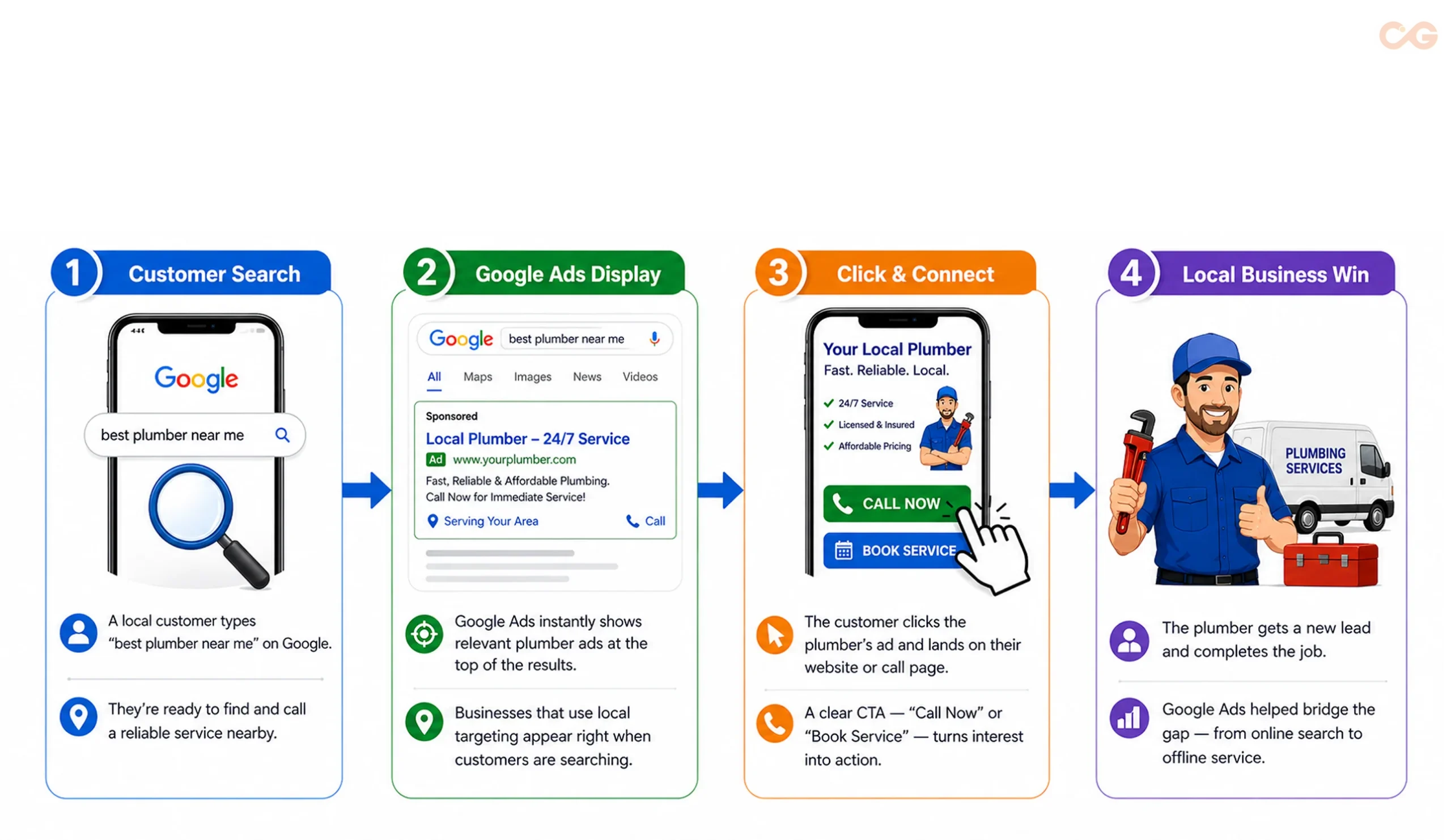
Before delving into details, let’s understand the significance of Google Ads.
Imagine you run a small boutique in Koramangala, Bangalore. When someone searches for custom Kurtis in that area, don’t you want your store to be among the top results? That’s the essence of Google Ads — it connects you with potential customers right as they are ready to make a purchase.
Many small business owners find that digital advertising levels the playing field against bigger companies. In India’s fast-growing digital landscape, this method outmatches traditional advertising.
Case Study: HDFC ERGO Improves Google Search Ads Performance
Challenge:
HDFC ERGO aimed to improve the performance of its Google Search Ads while maintaining profitability in a competitive insurance market.
Approach:
The company conducted a nine-week Google Ads experiment, testing Target ROAS Smart Bidding, Broad Match keywords, and Responsive Search Ads against its existing Search campaign strategy.
Results:
The AI-powered Google Ads campaign delivered an 84% increase in revenue and a 49% improvement in Return on Ad Spend (ROAS) compared to the previous campaign strategy.
Key Takeaway:
This case study demonstrates how Google Ads features such as Smart Bidding, Broad Match keywords, and Responsive Search Ads can improve Search campaign performance. While results vary by business, these optimisation techniques can help advertisers improve campaign efficiency and maximise returns.
Understanding Google Ads
What is Google Ads and How Does it Work?
Think of Google Ads as renting billboard space on the busiest road — except this road is the internet. You only pay when someone clicks on your advertisement.
Google Ads setup is based on the pay-per-click (PPC) model. This means you only incur costs when someone interacts with your ad. If a thousand people see it but none click, you pay nothing. This makes it a cost-effective option for small businesses looking to explore digital marketing.
Take action and incorporate Google Ads into your strategy. It can open doors to new customers and drive sales effectively.
Understanding the True Cost of Google Ads in India
Let’s break it down with some key figures, as that’s what you need.
For small businesses in India, the price of Google Ads can vary significantly based on your industry and chosen keywords. Here’s a straightforward pricing overview based on the research of MegaDitalAI, keeping in mind that actual costs will depend on specific industry factors and campaign goals:
Search Ads: ₹20-150 per click (CPC)
Display Ads: ₹5-10 per click
Shopping Ads: ₹24 per click
Video Ads: ₹50-150 per thousand impressions (CPM)
Take Advantage of Starter Credits
The good news is that Google offers a starter credit. When you spend ₹20,000 in the first 60 days of your free account, you’ll receive an additional ₹20,000 in ad credit, effectively doubling your initial investment, as noted by TrueHost.
People Also Ask: How much does Google Ads cost in India?
If you’re wondering about costs, the average daily budget for Google Ads in India typically falls between ₹200 and ₹500. For small businesses, a practical monthly budget is around ₹5,000 to ₹15,000, depending on industry competition and campaign goals, according to ReuAds.
Takeaway

Download your free Google Ads Success Guide to access a year-round optimisation checklist, expert hiring guidance, and Google Ads management cost insights.
Getting Started with Google Ads for Small Businesses
How to Create a Google Ads Account — Step-by-Step Flowchart
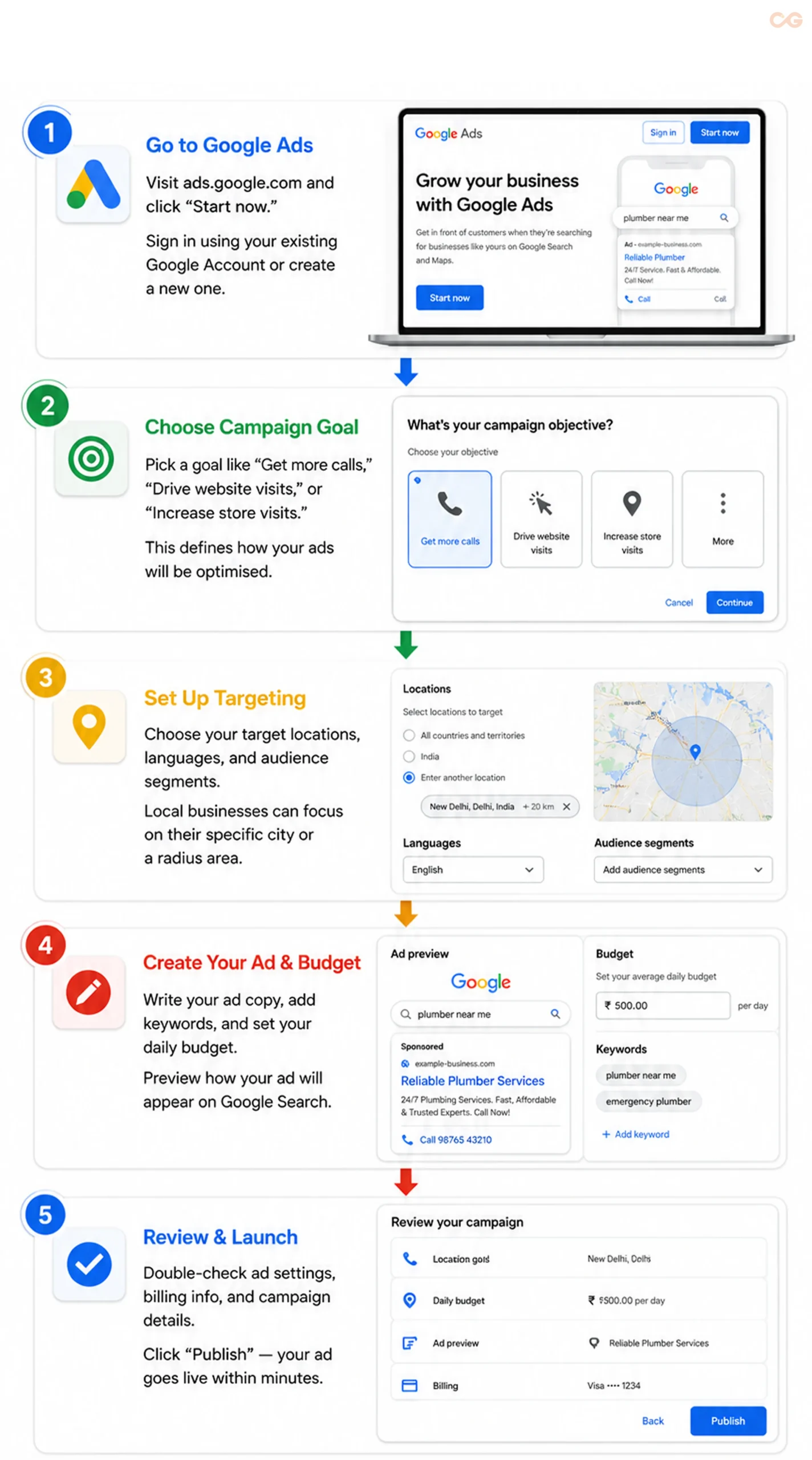
Let’s dive into the practical steps for setting up Google Ads for your small business — it’s simpler than you might think.
Step 1: Create Your Google Ads Account
- Visit ads.google.com and sign in with your Google account to access all Google Ads features.
Identify your main advertising goal, whether it’s increasing sales, generating leads, or driving traffic to your website.
Carefully choose your business type and location to ensure your ads reach the right audience.
Set your account preferences and billing
details Important Note for Indian Businesses: If your business is registered, you’ll need your GST details for billing. Google accepts various payment methods in India, including credit/debit cards, net banking, and UPI.
Step 2: Define Your Campaign Objective
Google offers different types of campaigns, but focus on these essential options for beginners:
- Search Campaigns: Your ads will appear when users search for keywords related to your business, ideal for service providers and sellers.
- Display Campaigns: Image ads will show up on Google partner sites, which is effective for brand visibility.
- Shopping Campaigns: Showcase product images directly in search results, perfect for e-commerce businesses.
- Video Ads: Promote your brand on YouTube to tell compelling stories and demonstrate products.
- Local Campaigns: Target local foot traffic, which is particularly useful for small businesses with physical locations in India.
Step 3: Conduct Keyword Research and Set Up Targeting
An effective Google Ads strategy starts with understanding how your customers search online.
Use Long-Tail Keywords: Instead of broad keywords like bakery Mumbai, target more specific searches such as:
- Custom birthday cakes Mumbai
- Eggless cake delivery Andheri
- Same-day cake delivery Bandra
These keywords are generally less competitive and attract customers with stronger purchase intent.
Use Google Keyword Planner: Google’s free Keyword Planner helps you identify keyword ideas, search volumes, estimated costs, and competition levels.
Target the Right Audience: Define your campaign by selecting the right locations, languages, and audience segments. Local businesses can focus on specific cities, neighbourhoods, or a radius around their store.
Think Like Your Customer: Someone searching for a 24-hour plumber in Mumbai is more likely to convert than someone searching simply for a plumber.
Use Local Languages: Since India is multilingual, consider creating campaigns in regional languages to reach a wider audience. For example:
- English: Best biryani in Mumbai
- Hindi: मुंबई में सबसे अच्छा बिरयानी
- Marathi: मुंबईतील सर्वोत्तम बिर्याणी
A multilingual strategy can help improve relevance and reduce your cost per click (CPC) by connecting with customers in their preferred language.
Step 4: Create Your Ad and Set Your Budget
Now it’s time to build your ad. Write compelling headlines, highlight your unique selling points, include relevant keywords, and use a clear call-to-action. Before publishing, preview your ad to ensure it appears correctly on Google Search.
Next, set a daily budget that aligns with your marketing goals. If you’re new to Google Ads, starting with a modest budget allows you to test different keywords, audiences, and ad copy before scaling your campaigns.
The Difference Between a Poorly Optimised and a
Well-Optimised Google Ad
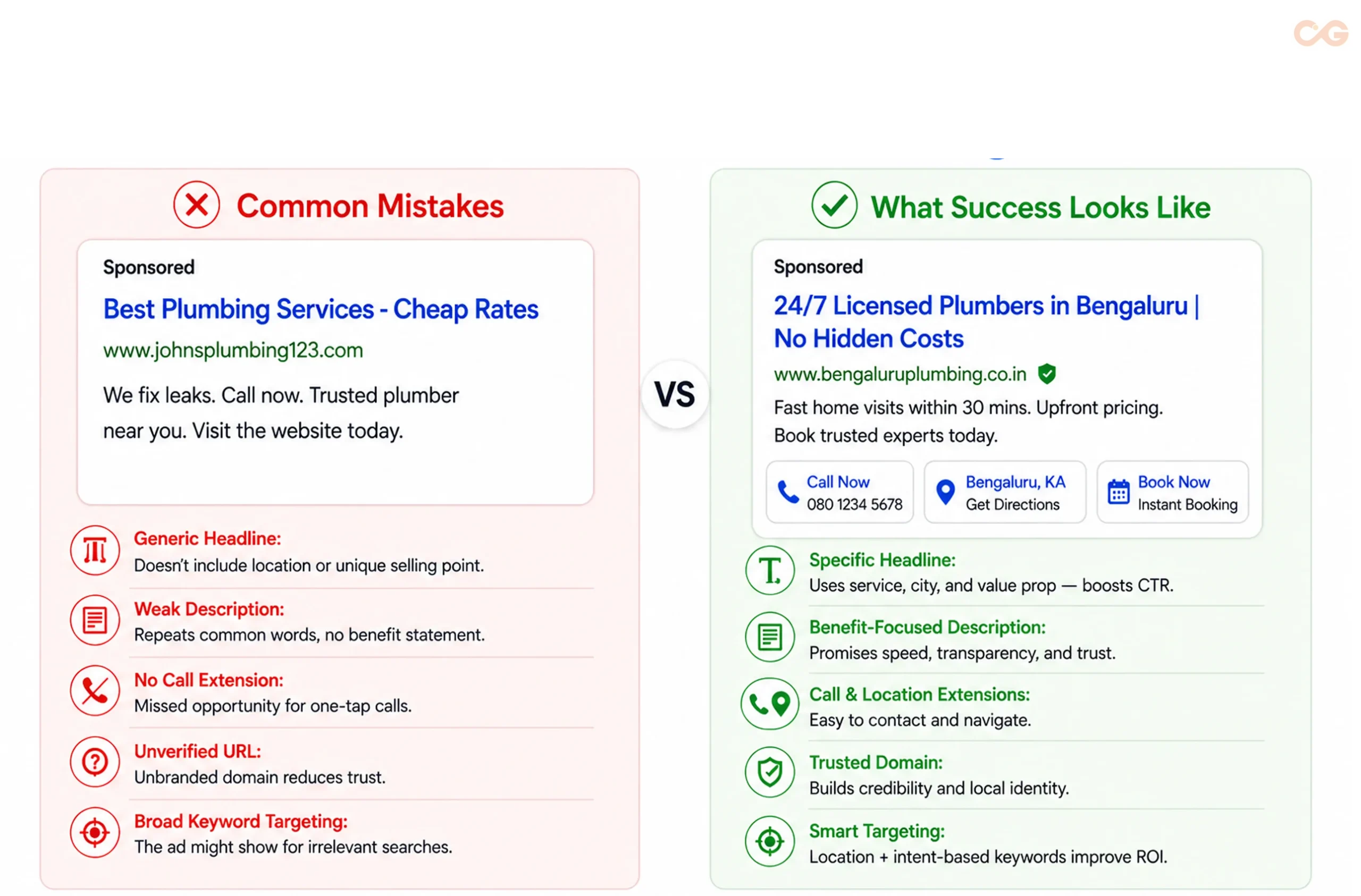
Step 5: Review and Launch Your Campaign
Before publishing, review your campaign settings carefully. Verify your targeting, keywords, budget, bidding strategy, billing information, and ad copy to ensure everything is accurate.
Once you’re satisfied with the setup, click Publish. After Google’s review process, your campaign will begin reaching potential customers who are actively searching for your products or services.
Setting Your Budget: A Practical Method
Honesty is crucial when it comes to budgeting. Many small businesses either overspend or underspend on their campaigns.
The 5-20% Rule
Consider spending between 5% and 20% of your gross revenue on marketing, as per Hawksem, and of this, 53.8% of this budget typically goes towards digital channels, as noted in the CMO Survey of Deloitte.
E.g. a small enterprise earning ₹50 lakhs per year:
- Total marketing budget: 2.5-10 lakhs.
- Digital advertising: ₹1.35–5.38 lakhs
- Google Ads portion: ₹67,000–2,69,000 annually
This means a monthly budget of approximately ₹5,600 to ₹22,400, which is quite manageable.
Start Small and Scale Efficiently
Begin with a budget of ₹5,000 to ₹10,000 in your first month. This will help you understand keyword conversions, optimal posting times, effective ad copy, and actual customer acquisition costs. This knowledge will enable you to run successful Google Ads campaigns in the future.
Understanding Google Ads Campaign Structure
Now that your first campaign is ready to launch, it’s important to understand how Google Ads is structured. A well-organised campaign improves ad relevance, simplifies campaign management, and lays the foundation for better performance.
Campaign Structure Basics
Google Ads is organised into three levels:
1. Campaign Level
This is where you set your overall budget, choose the campaign type (such as Search, Display, or Shopping), define your target locations, and select a bidding strategy. These settings apply to the entire campaign.
2. Ad Group Level
Each campaign contains one or more ad groups that organise related keywords and ads around a specific product, service, or theme. Well-structured ad groups improve ad relevance and contribute to a better Quality Score.
3. Ad Level
This is the advertisement that users see on Google Search or other Google platforms. Each ad should closely match the keywords in its ad group and include a clear value proposition and call-to-action.
Leverage Ad Extensions in India
Ad extensions provide additional information alongside your ads, making them more useful and increasing their visibility. For Indian businesses, they can also improve click-through rates and help customers take action more quickly.
- Location Extensions: Display your business address and map to attract nearby customers.
Call Extensions: Add a clickable phone number so potential customers can contact you directly.
Price Extensions: Showcase product or service pricing to build transparency and trust.
Promotion Extensions: Highlight discounts, festive offers, or limited-time deals to encourage clicks.
Sitelink Extensions: Direct users to specific pages such as products, services, pricing, or booking pages for a better user experience.
Optimise Google Ads for Maximum Impact
Setting up your campaigns is just the beginning. Optimisation transforms your ads into revenue-generating assets.
The Importance of Quality Score
Google assigns a Quality Score (from 1 to 10) to each ad. A higher score leads to lower cost-per-click, improved ad placements, and increased impressions.
What Influences Quality Score?
Key factors include Click-Through Rate, ad relevance, and landing page experience. Ads that engage users effectively through high CTR and mobile-friendly landing pages will drive efficiency in costs and conversions.
Tip: With the popularity of mobile browsing in India, ensure your landing pages load within three seconds to prevent losing potential customers.
Pro Tip: Indian users access the internet through mobile devices, and most of the time, a slow-loading landing page would cost you visitors and sales. Make sure that your pages are loaded within less than three seconds, even on a 4 G connection.
Track Conversions to Measure Success
To maximise your results, implement conversion tracking. This lets you quantify actions like phone calls, form submissions, and online purchases. Use this data to refine your campaigns.
Utilise Negative Keywords to Save Costs
Negative keywords prevent ads from showing up in irrelevant searches, protecting your budget from unqualified clicks. For high-end leather bags, avoid terms like cheap, free, second-hand, or wholesale. For luxury Indian resorts, exclude keywords such as budget or cheap stays to attract the right audience.
Implement A/B Testing for Ongoing Improvement
Always maintain two to three ad variations, each with different headlines, calls-to-action, and value propositions. This will help you identify the most effective combination for driving clicks and conversions. Google favours well-performing ads, increasing their visibility over time.
Capitalising on Seasonal Trends in India
One significant advantage for businesses in India is the clear seasonal cycles they can capitalise on.
Always maintain two to three ad variations, each with different headlines, calls-to-action, and value propositions. This will help you identify the most effective combination for driving clicks and conversions. Google favours well-performing ads, increasing their visibility over time.
Crafting a Seasonal Strategy
Start planning your campaigns 3-4 weeks before major festivals. Incorporate countdown timers in your ads, like “Only 15 Days to Diwali!” Refresh your visuals and messages to align with the festive mood using appropriate colours and themes.
By applying these principles, your business can effectively navigate the advertising landscape and maximise its reach throughout the year.
Local Targeting: A Game-Changer for Indian Small Businesses
How can I attract local customers using Google Ads?
This is where smaller businesses can truly excel against larger competitors.
Hyperlocal Targeting Strategies:
1. Radius Targeting:
Implement geo-targeting to create a defined area around your business. Adjust bids based on distance, prioritising nearby customers who are more likely to engage or make a purchase.
2. Neighbourhood-Specific Keywords:
Incorporate localised keywords to connect with distinct areas in your city. This approach ensures your messaging aligns with the unique preferences of each neighbourhood, enhancing ad relevance.
3. Pin Code Targeting:
Utilise pin codes for precise audience targeting. This strategy ensures your ads reach individuals in key local regions, aligning with your ideal customer profile.
4. Store Visit Tracking:
Analyse how online interactions drive foot traffic to your store. This bridges the gap between the digital and physical worlds, showing how your campaigns influence actual customer behaviour.
Local Extension Optimisation:
Ensure your Google My Business profile is always up to date. Include accurate information, fresh images, regular updates, and customer reviews. This enhances your local visibility, builds reputation, and fosters connections with potential buyers.
Compliance: Essential Indian Advertising Regulations
Google Ads in India: Do’s & Don’ts Every Advertiser Should Follow
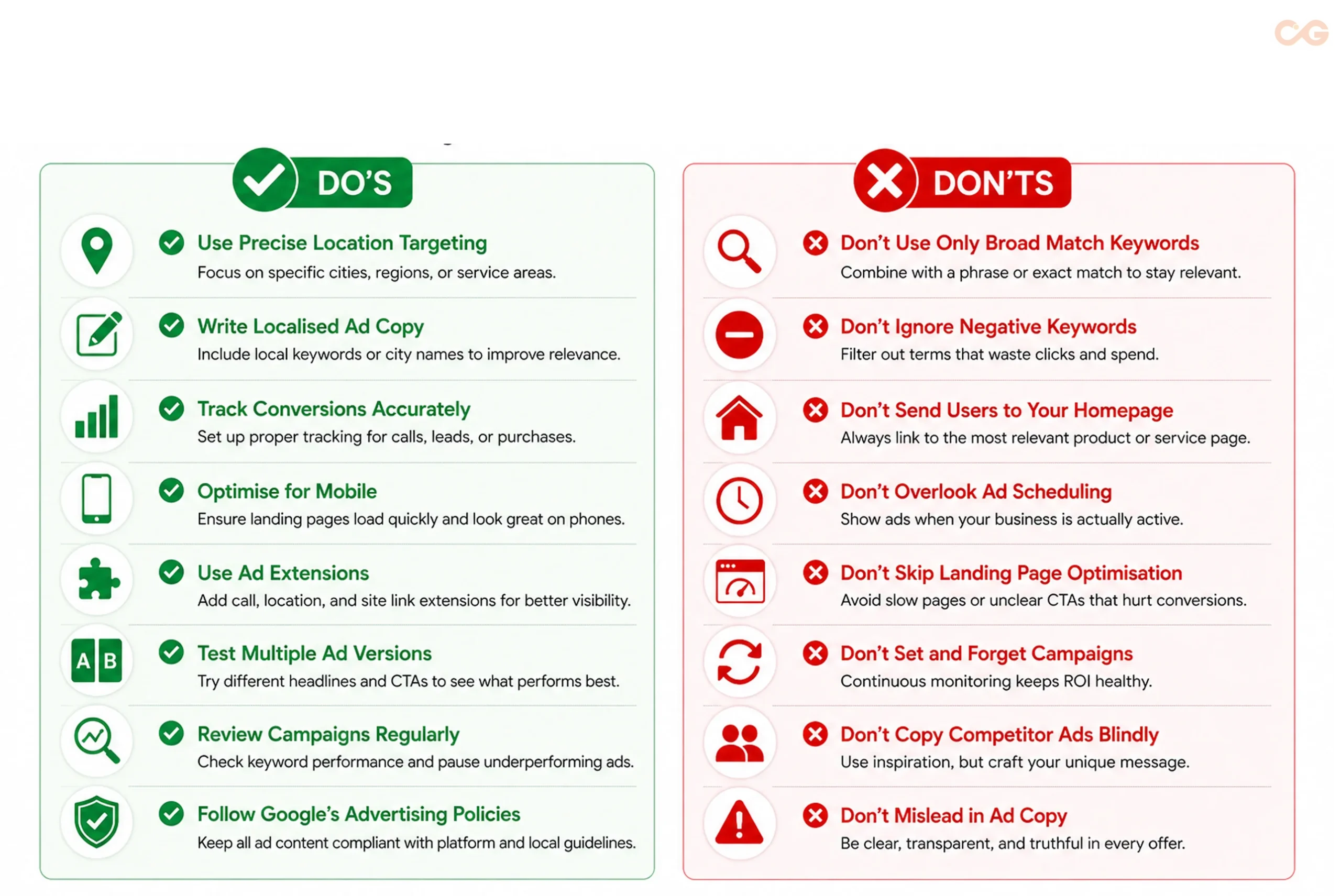
Takeaway
Download your free Google Ads Success Guide to access a year-round optimisation checklist, expert hiring guidance, and Google Ads management cost insights.
Here’s a brief overview of the key compliance requirements:
1. GST Display:
Always display prices inclusive of GST or clearly state if taxes are additional. Transparent pricing fosters trust and complies with Indian advertising and consumer protection laws.
2. Industry-Specific Disclosures:
Healthcare: Include disclaimers like “Results may vary.” Avoid guaranteeing cures. All claims must be backed by solid clinical evidence.
Financial Services: Clearly state that terms and conditions apply, using bold text. Avoid guaranteeing returns, as market-linked products carry risks and must follow SEBI and RBI advertising regulations.
Food Supplements: Do not claim to diagnose, treat, or cure illnesses. Follow all FSSAI labelling and advertising standards, stating only nutrition or health benefits, not medical effects.
Education: Do not present false information or exaggerate placement success, salaries, or success rates. Ensure that data is accurate, verifiable, and sourced from reputable records.
3. Trademark Compliance:
Do not bid on competitors’ brand names without permission. Misuse of trademarks can breach policy and may lead to account removal or legal disputes.
4. Consumer Protection Act, 2019:
Avoid making false claims about discounts and exaggerated offers. Ensure all promotions and sales are genuine and verifiable to protect consumers and maintain brand integrity.
5. ASCI Guidelines:
Follow ethical advertising standards. Avoid discrimination, objectification, or misleading information. Be factual, check your sources, and represent information responsibly.
Mobile-First Strategy: Essential for the Indian Market
Consider this: Mobile advertising accounts for 70-80% of digital ad spending in India, reflecting user behaviour, according to the research of Mint.
Key Mobile Optimisation Strategies:
1. Mobile-Specific Ad Copy:
Write concise and impactful mobile ads. Highlight key benefits and offers, as users have limited attention spans and smaller screens require clarity and engagement.
2. Click-to-Call Priority:
Ensure your phone number is easily visible and clickable. Mobile users prefer immediate contact over filling out forms, making click-to-call functionality essential for driving conversions.
3. Mobile Landing Pages:
Develop mobile-friendly landing pages that load quickly, minimise form fields, include large buttons, and avoid pinch-to-zoom. This simplifies user experience, reduces friction, and boosts conversions.
4. Mobile Bid Adjustments:
Analyse performance data and adjust bids for mobile devices accordingly. Increasing bids for high-converting mobile traffic will enhance visibility and connect you with relevant users.
5. App Promotion Campaigns:
Promote your mobile app with targeted campaigns focused on installs, user engagement, and retention. Use compelling creatives and clear mobile-specific calls-to-action.
Effective Bidding Strategies on a Small Budget
For small businesses, the success of PPC often depends on choosing the right bidding strategy.
Bidding Options:
Manual CPC:
This option gives you total control over the maximum price per click. It’s ideal for beginners, allowing precise budget management without the need for automated adjustments.
Enhanced CPC (ECPC):
Google adjusts your manual bids to improve conversion opportunities. This method combines manual input with smart automation, enhancing overall performance while maintaining your bidding approach.
Target CPA (Cost Per Acquisition):
Here, you set your desired cost for each conversion. Google aims to maximise bids based on your target, but effective targeting relies on well-converting ads.
Maximise Conversions:
Google automatically sets bids to achieve the highest number of conversions within your budget. This strategy only works optimally if backed by sufficient conversion data.
Target ROAS (Return on Ad Spend):
For e-commerce businesses, define a preferred return on ad spend. Google can optimise bids to meet your revenue goals, ensuring your budget is used effectively for profitable campaigns.
Recommendations for Beginners:
Months 1-2: Use Manual CPC. Get familiar with your campaign’s performance while having complete control over your bidding strategy.
Months 3-4: Transition to Enhanced CPC. Enjoy the benefits of Google’s smart adjustments while retaining some control.
From Month 5 Onward: Move to Target CPA or Maximise Conversions. Allow automation to take over, focusing on conversion goals and budget efficiency.
This approach helps you learn before relying on algorithms.
Common Mistakes Made by Indian Small Businesses and How to Avoid Them
Avoid major pitfalls observed in numerous businesses.
Mistake 1: Lack of Regular Management
Google Ads requires consistent attention. Check at least three times a week for costly, low-converting keywords, ineffective ads, and unproductive time slots or locations.
Mistake 2: Ignoring the Search Terms Report
The search terms report shows the exact queries triggering your ads. Neglecting this data can lead to irrelevant clicks. Regularly review this report to refine your keywords and boost conversions.
Mistake 3: Link to Homepage Instead of Targeted Landing Pages
Directing all traffic to your homepage reduces relevance and confuses users. Instead, create dedicated landing pages that match your ad promises to enhance user engagement and conversions.
Mistake 4: Not Utilising Location Data
Analyse location data to identify areas that generate the most conversions. Direct your budget to these high-performing regions to enhance ROI and avoid wasting money on less profitable locations.
Mistake 5: Competing Against Yourself
Avoid bidding aggressively on your own brand name if you already rank highly organically. Use defensive campaigns only when competitors pose a threat. This prevents excessive spending and maintains ad visibility.
Mistake 6: Neglecting Mobile Experience
A poor mobile landing page can drastically reduce conversions. Test your pages on real 4G connections to ensure fast loading, user-friendly buttons, and mobile-friendly designs to maintain traffic and budget efficiency.
Mistake 7: Setting Unrealistic Expectations
Understand that Google Ads may not provide immediate returns. Expect campaigns to take two to three months for optimisation. Stay patient and continuously improve to achieve significant results long-term.
Integrating Payments and CRM for Small Businesses
To maximise Google Ads effectiveness, integrate your campaigns with your business systems.
Payment Method Integration:
Google Ads in India offers various payment options, including credit and debit cards, net banking, UPI, and digital wallets like Paytm and Razorpay.
Pro Tip: Set up automatic payments with a backup to prevent disruptions and maintain campaign continuity.
CRM Integration:
Connect Google Ads with:
Zoho CRM: Ideal for Indian SMBs, it captures, tracks, and manages leads effortlessly.
LeadSquared: Great for businesses with longer sales cycles, it helps in nurturing leads until they convert.
WhatsApp Business API: Track leads from WhatsApp ads and gain valuable insights for direct conversions.
Google Sheets: A free tool for lead management and analysis, enabling easy export and reporting of leads.
Monitoring Phone Conversions:
Utilise platforms like:
Knowlarity: Offers virtual numbers, IVR systems, and call tracking for efficient customer interactions.
MyOperator: Provides call recording and analytics, simplifying communications and lead management.
Ozonetel: Delivers cloud telephony, IVR, and real-time dashboards to refine call management and improve customer experiences.
These systems enable tracking of campaigns that generate calls, critical in India, where many conversions happen via phone.
Evaluating Success: Key Performance Indicators (KPIs) That Count
Not all metrics hold the same weight. Concentrate on these essential KPIs:
Primary KPIs
1. Return on Ad Spend (ROAS)
Calculation: ROAS = Revenue ÷ Ad Spend.
ROAS measures how many rupees you gain for each rupee spent on ads. Aim for a minimum of 3:1.
2. Cost Per Acquisition (CPA)
Formula: CPA = Total Ad Spend ÷ Number of Conversions.
CPA assesses the cost to gain a single customer. Ensure it never surpasses your profit per customer.
3. Conversion Rate (CVR)
Calculation: (Conversions ÷ Clicks) × 100.
CVR shows the effectiveness of your ad clicks converting into actual sales. A rate of 2-4% is typically desirable across many sectors, according to Store Growers.
Secondary KPIs
4. Click-Through Rate (CTR)
CTR reflects how relevant your ads are to your target audience. A solid benchmark is 3-5%.
5. Quality Score
Quality Score evaluates the relevance and effectiveness of your keywords, ads, and landing pages. Aim for a score of 7 or above.
6. Impression Share
Impression Share reveals the percentage of total potential impressions that your ads achieve. Low scores suggest issues with visibility or bidding strategies.
Tips for Enhancing Google Ads Performance
After you’ve grasped the basics and established profitable campaigns, consider these strategies to scale up:
1. Remarketing Campaigns
Target users who have visited your site but haven’t converted. Retargeting can be highly effective, with 26% of users returning to previous sites. Mobile app retargeting can boost conversions by 38%, as per DemandSage.
2. YouTube Advertising
YouTube ads are cost-effective, ranging from 40 to 150 rupees per 1,000 views. Use them to raise brand awareness and explain complex products smoothly, as per the research of The DM School.
3. Dynamic Search Ads
Automatically generated based on your website content, Dynamic Search Ads fit well for e-commerce sites with extensive inventories.
4. Smart Shopping Campaigns
Leveraging AI, Smart Shopping Campaigns optimise ads across Search, Display, YouTube, and Gmail, enhancing e-commerce performance.
5. Performance Max Campaigns
Performance Max is an AI-driven solution for running ads across all Google platforms. It delivers optimal results when backed by accurate conversion data.
Troubleshooting Non-Performing Campaigns
Low Performance? Follow This Google Ads Troubleshooting Flowchart
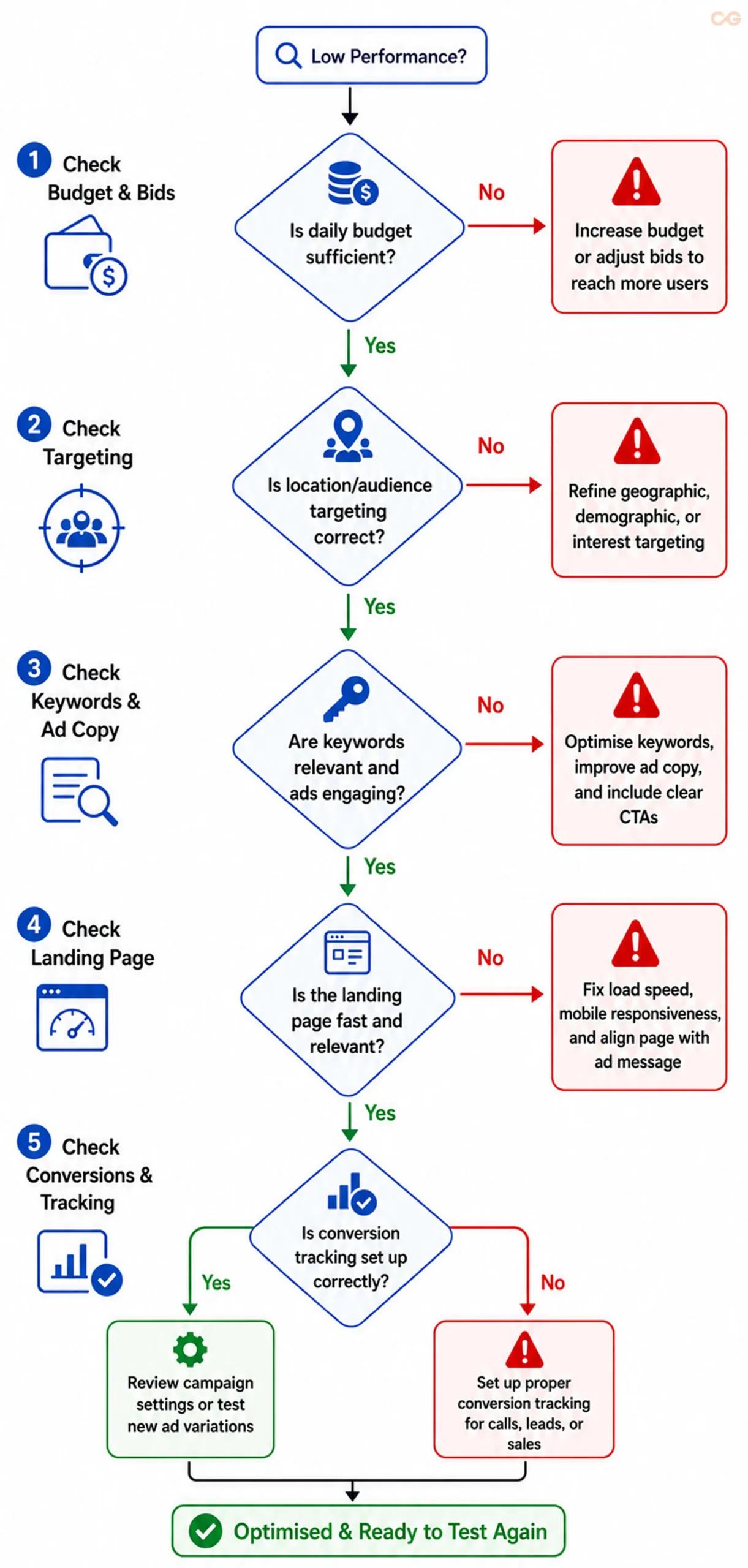
Diagnostic Checklist for Underperforming Campaigns
1. High Clicks, No Conversions
Problem: Many users click on your ads but don’t buy. This is often due to ineffective landing pages or poor audience targeting.
Solution: Improve page load speed, streamline forms, add credibility elements like testimonials and security seals, better target with Search Terms Reports, and test different pricing or financing options.
2. Low Clicks
Problem: Few users are clicking your ads. This could stem from poor placement, weak copy, or irrelevant keywords.
Solution: Increase your bid for better placement, focus your ad copy on benefits and strong CTAs, and research keywords your target audience actively searches for.
3. High Costs
Problem: Your campaign is losing money due to broad keywords, low Quality Scores, or intense competition.
Solution: Narrow down your long-tail keywords, improve ad relevance and landing page alignment, and limit targeting to specific locations or times for cost efficiency.
Future Trends in Google Ads for Small Businesses in India
In the future, these are trends that will influence Google Ads for small businesses in India:
1. Voice Search Optimisation
With the rise of smart speakers, adapt to conversational and long-tail queries. For instance, consider phrasing like “Hey Google, best biryani near me” to align with natural language.
2. AI-Driven Campaign Management
Google’s Smart Bidding and Performance Max are now standard, automating conversion and ROAS optimisation, making campaign management less labour-intensive.
3. Increasing Vernacular Content
As more users search in languages like Hindi, Tamil, Telugu, and Bengali, businesses using local language ads enjoy lower CPC and better engagement, catering to native speakers.
4. Local Shopping Integration
Google is enhancing the e-commerce experience in India. Leverage local inventory ads and Shopping campaigns to connect with nearby customers, boosting both online and offline performance.
5. Privacy-First Advertising
Building a customer database is crucial. Focus on gathering first-party data for effective targeting and sustained marketing efforts.
Conclusion: Getting Started with Google Ads
Campaigning effectively on Google isn’t about having the biggest budget. It’s about strategy, clever decision-making, and consistency.
Week 1-2: Set up your account, conduct keyword research, and launch your first campaign.
Week 3-4: Evaluate performance, implement negative keywords, and test ad copy variations for improvement.
Month 2: Optimise campaigns based on data insights, adjust bids, and enhance the landing page experience.
Month 3+: Scale successful campaigns, explore new opportunities, and start remarketing to capture additional conversions.
Recognise that many successful e-commerce businesses began just like you — navigating uncertainty but eager to learn.
The key difference between thriving businesses and those struggling with Google Ads is not intelligence or resources. It’s persistence and willingness to adapt based on insights.
Immediate Action Steps
1. Set Up Your Google Ads Account: Spend about 30 minutes ensuring accurate business information.
2. Install Conversion Tracking: Dedicate 45 minutes to monitoring key actions like purchases, sign-ups, or lead submissions.
3. Identify Relevant Keywords: Allocate 1 hour to select 10-15 high-intent keywords that drive conversions.
4. Create 3 Ads: Use 30 minutes to write three ads with unique and compelling headlines.
5. Keep a Modest Daily Budget: Start with ₹300-₹500 per day to safely test and refine your campaigns.
6. Launch Your First Campaign: Activate your campaign and closely monitor its performance, adjusting based on results.
Don’t overthink it. After launching, take time to analyse and refine.
According to a report published by Bain and Company, the Indian digital advertising market is projected to grow at a 15% annual rate from 2024 to 2029. Competitors are already engaged in online advertising. The question isn’t whether you can afford Google Ads; it’s whether you can afford not to.
Potential customers are searching for your products right now. Ensure they find you.
Takeaway
Download your free Google Ads Success Guide to access a year-round optimisation checklist, expert hiring guidance, and Google Ads management cost insights.
Frequently Asked Questions
Can I use Google Ads without a website?
Absolutely! You can direct traffic to your Google My Business listing, WhatsApp Business, or even a phone number. However, having a website gives you better control and typically leads to superior results.
When will I see results?
You’ll notice clicks immediately, but significant conversion data will typically show up within 2-4 weeks. Full optimisation can take around 2-3 months.
How does being highly local affect my business?
This is ideal for Google Ads! Utilise radius targeting (1-5 km) and focus on hyperlocal keywords and “near me” searches. Local businesses generally enjoy a better ROI compared to larger campaigns.
Should I pause campaigns during slow periods?
Not necessarily. Lower competition can mean lower costs during slow times. Instead of halting campaigns, consider reducing budgets by 30-50%.
Is it effective to run Google Ads only during festivals?
Yes, but maintaining a consistent presence enhances Quality Scores and audience engagement. A balanced approach of lowering budgets in the off-season and increasing them during peak times works best.
Which sectors in India benefit most from Google Ads?
Industries like home services, professional services, e-commerce, local businesses, education, healthcare, real estate, and B2B services are well-suited for Google Ads.
How do I handle competitors clicking my ads?
Google has mechanisms to detect fraud. Most genuine competitor clicks are minimal and won’t significantly affect your campaign. Focus instead on improving your campaign.